TrinityX pre-installation requirements
Hardware requirements
TrinityX has very few hardware requirements
Base Architecture
The simplest supported architecture consists of:
- Two or more machines ( one controller and one or more compute nodes )
- Internal network
- External network gateway
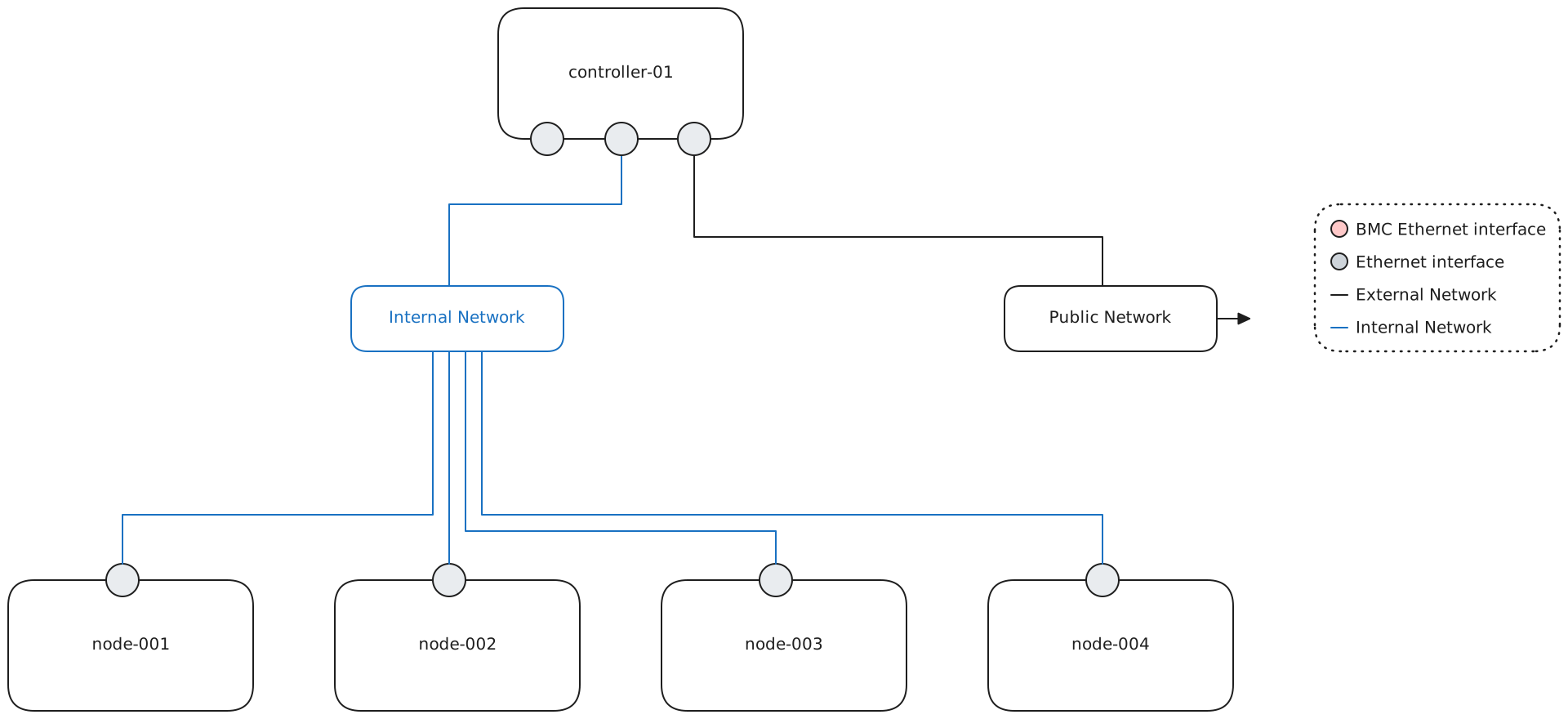
The machines that will be used as TrinityX controllers are expected to have a minimum of 2 interfaces. This may be physical interfaces or tagged VLAN interfaces.
- one interface connected to the public network, through which end-users will access the cluster
- one interface connected to the internal network, used by TrinityX to provision compute nodes, gather telemetry and facilitate cluster communications in general.
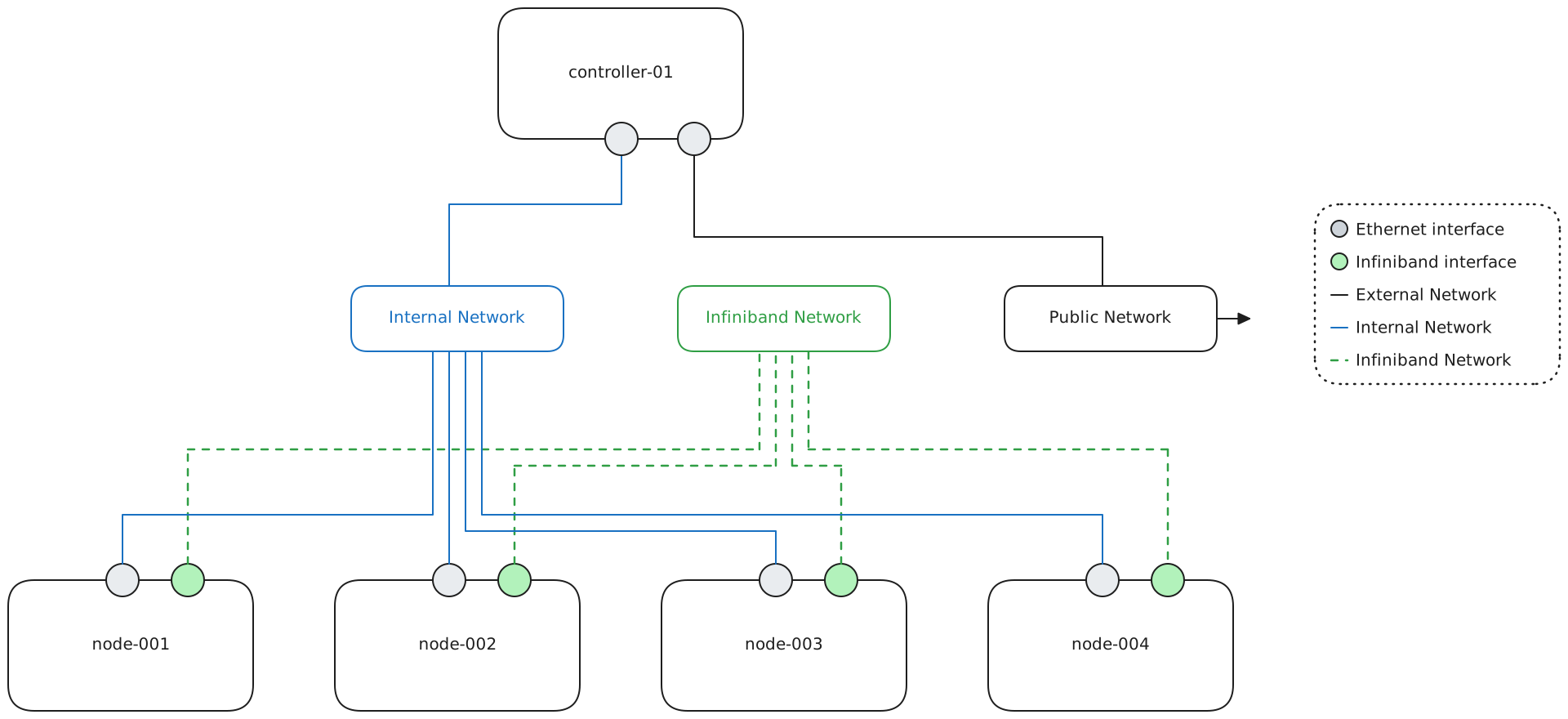
Additional interfaces may be configured such as a high-speed interface for datatransmission or computations (e.g. RoCE or InfiniBand).
IPMI Architecture
Most commercial grade servers now come with a Intelligent Platform Management Interface , TrinityX supports communicating with IPMI boards in order to manage power status, monitor power usage and other hardware faults.
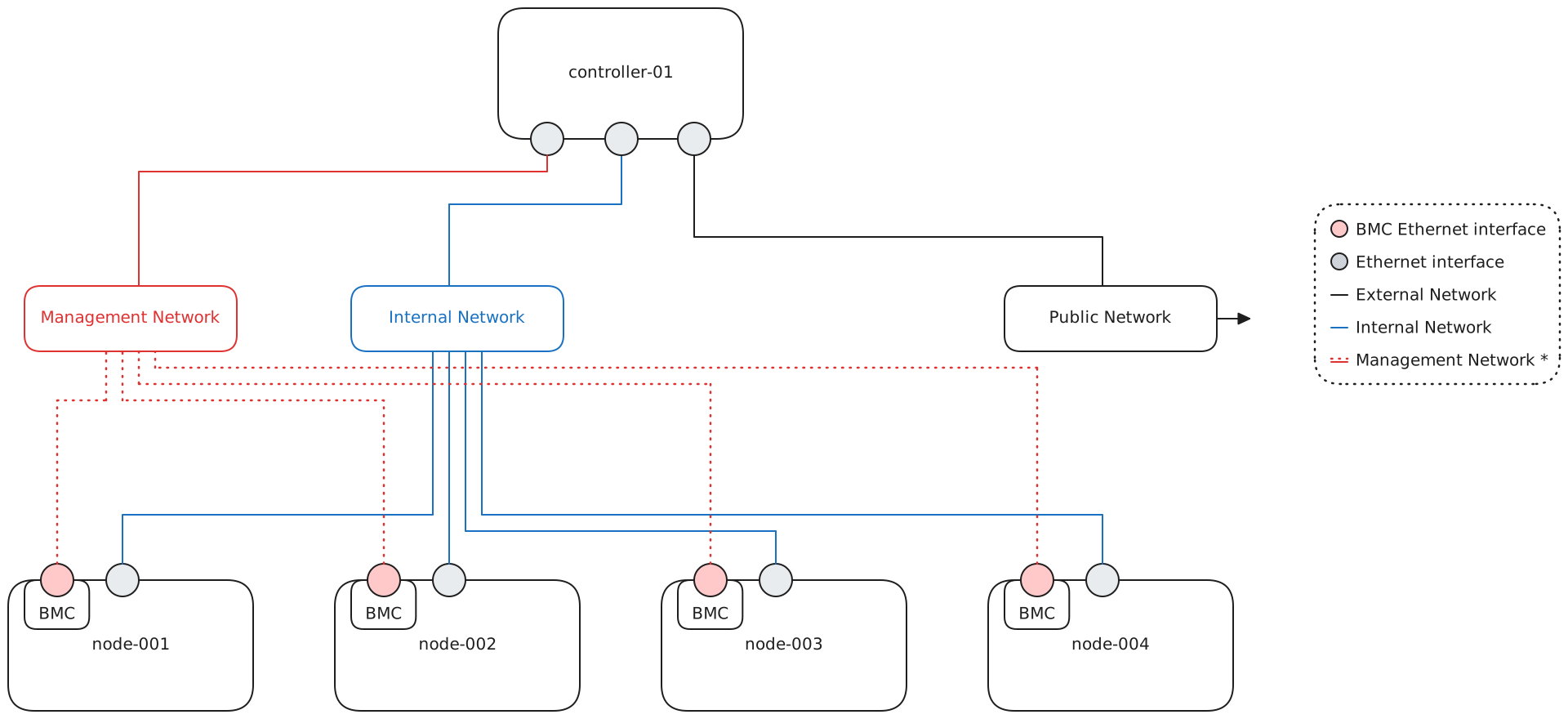
In this case your architecture might look more like the picture above, and, the controller machine will have 4 interfaces:
- one interface connected to the public network
- one interface connected to the internal network
- one interface connected to the management network
Whereas the compute machines will have two interfaces:
- one interface connected to the internal network*
- the BMC interface connected for the management network*
Depending on the machine layout it's possible that the IPMI board has either a dedicated IPMI interface or a combined LAN/IPMI interface.
High-throughput Architecture
Usually HPC cluster take advantage of fast interconnect equipment like Infiniband or RoCE. In this setup compute nodes will have
Complete Architecture
A comprehensive architecture generally consist of 4 networks:
- public ( Used by end-users to access services )
- internal ( Used for image provisioning and node management )
- management ( Used to communicate with the BMC boards )
- high throughput ( Used by computational software to transfer data between machines )
For security reasons, the public network should be hosted on a separate physical infrastructure or it should make use of VLAN to segregate the broadcast domains, internal, management and high-throughput can instead cohexist on the same L2 network.
The controller machines will therefore have 3 interfaces:
- one interface connected to the public network
- one interface connected to the internal network
- one interface connected to the management network
Whereas the compute nodes will also have 3 interfaces:
- one interface connected to the internal network
- one interface connected to the public network
- the BMC interface connected to the management network
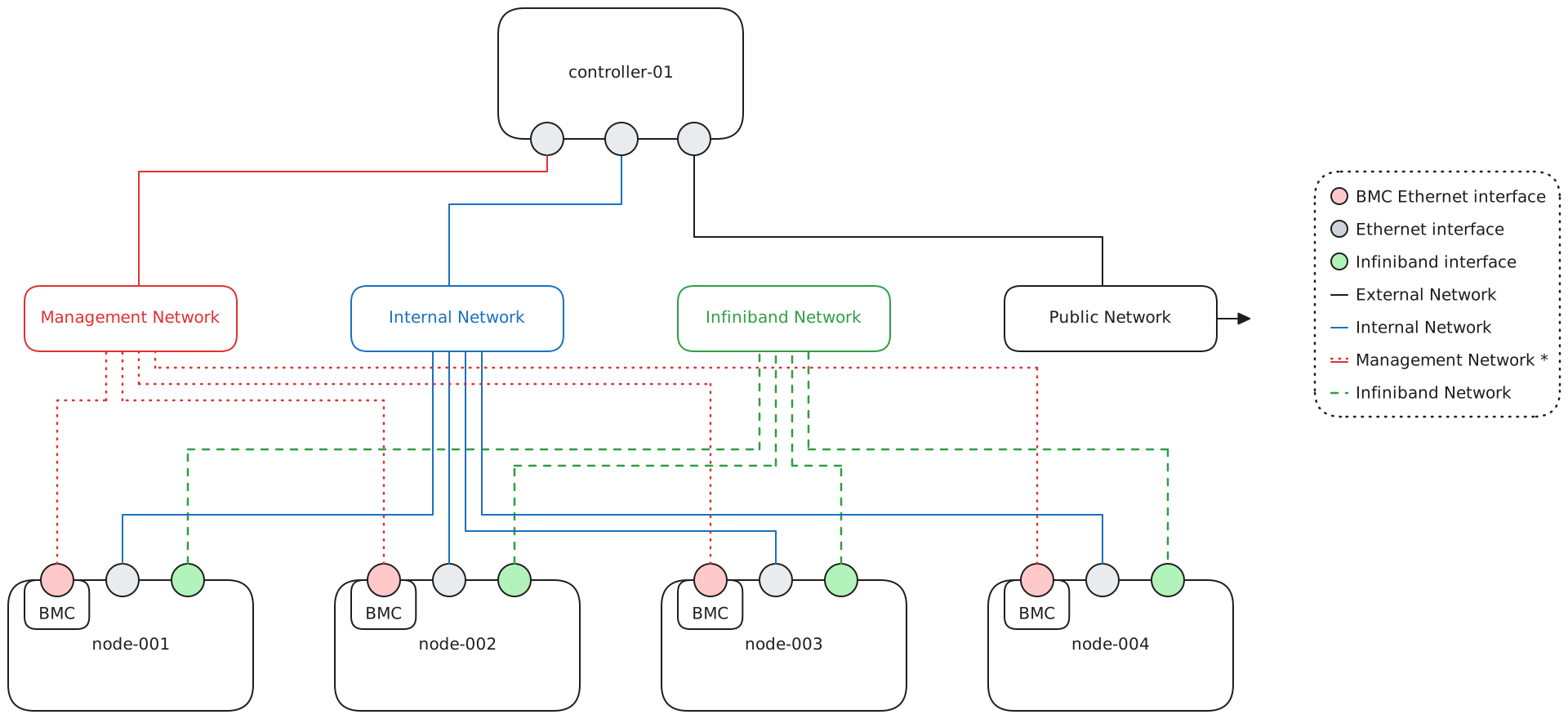
This is however just a reference implementation and is not binding or definitive; one might decide to create extra networks, or connect some nodes to the public one ( login nodes ), or connect the controller to the infiniband network and use it as a storage node, etc ````
Software requirements
Controller base installation and configuration
TrinityX is installed on top of a base Linux distribution. The following are supported:
| Controller | Nodes | Remarks | |
|---|---|---|---|
| EL8* | ✅ | ✅ | |
| EL9* | ✅ | ✅ | |
| EL10* | ✅ | ✅ | |
| Ubuntu | ❌ | ✅ | |
| OpenSUSE | ❌ | ✅ |
- Enterprise Linux: RedHat Enterprise Linux, or derivatives like Rocky Linux, AlmaLinux.
- Older versions such as the EL6 and EL7 and derivatives are entirely deprecated and it is not recommended to use these.
- Ubuntu: release 20, 22 and 24
- OpenSUSE: release 15.5
The installation can be completed in many ways (i.e. kickstart, USB, DVD, etc.), in general we only require a minimal installation. All other packages and software required will be installed by Ansible.
It is important to install only the Minimal edition, as some of the packages that are installed with larger editions may conflict with what will be installed for TrinityX. Note that when installing from a non-minimal edition, it is usually possible to select the Minimal setup at the package selection step. The network configuration of the controllers must be done before installing TrinityX, and it must be correct. This includes:
- IP addresses and netmasks of all interfaces that will be used by TrinityX; The services require that both the public and cluster network is configured and present.
The timezone must also be set correctly before installation as it will be propagated to all subsequently created node images.
If the user homes or the TrinityX installation directory (part of or whole) are to be set up on remote or distributed volume(s) or filesystem(s), all relevant configuration must be done before installing TrinityX.
The controllers must have enough disk space to install the base operating system, as well as all the packages required by TrinityX. For a simple installation this amounts to a few gigabytes only. Other components of Trinity will likely require much more space, namely:
- compute images;
- shared applications;
- user homes.
All of the above are located in specific directories under the root of the TrinityX installation, and can be hosted either on the controller’s drives or on remote filesystems. Sufficient storage space must be provided in all cases.
Partitioning best practices
The directory tree for Trinity starts with /trinity. The definitions can be found and tuned in group_vars/all.yml. It is however not recommended to change these.
/trinity path
For some parts /trinity is hardcoded and cannot be altered. This is however masked from the definitions in group_vars/all.yml.TrinityX is designed to be light where a minimum of 50GB of disk space would suffice. However, this does not take in account space needed for e.g. home directories or applications.
Some targets do require more space, such as trix_images (images), trix_shared (applications), and trix_home (home directories). Depending on the sizing of the cluster, you may want to place these locations under separate partitions:
- /trinity
- /trinity/images
- /trinity/local
- /trinity/shared
- /trinity/home
- /trinity/ohpc (if OpenHPC is enabled)
- /trinity/easybuild (if Easybuild is enabled)
As a rule of thumb, it comes recommended to use LVM for disk partitioning which allows resizing partitions when needed in the future.
For a typical standalone controller installation, the recommended minimum partitions and sizes would look like:
| lvm partition | size | remarks |
|---|---|---|
| / | 100GB | Depending on what's needed after installation |
| /var/log | 100GB | Do not underestimate how much log a cluster can generate |
| /boot | 2GB | leave some room for kernel updates |
| /boot/efi | defaults would do | |
| /trinity | 100GB+ | homes, images, local, shared, easybuild and OpenHPC location |
Of course locations can be altered before but also after the installation. E.g. the home directories can be supplied from another source like a NAS. This would influence the sizing.
HA Architecture
TrinityX supports a multi-controller setup to provide high-availability (HA). This is implemented using pacemaker-corosync. For services where active-active is not possible, trinityX relies on the availability of a shared disk. The default is utilizing a single DRBD disk with a ZFS zpool which is configured during the installation. This zpool will provide for:
- {{ trix_ha }}
- {{ trix_home }}
- {{ trix_shared }}
- {{ trix_ohpc }} (if OpenHPC is enabled)
- {{ trix_easybuild }} (if Easybuild is enabled)
The type, location, filesystem and layout of the shared disk can be configured in detail before the installation. NFS, iSCSI, DRBD and DAS are supported with xfs, ext4 and zfs as filesystems.
After installation, TrinityX will take care of either replicating the services across all the controllers, when the application supports it, or starting, stopping and moving the target service across controllers where required.
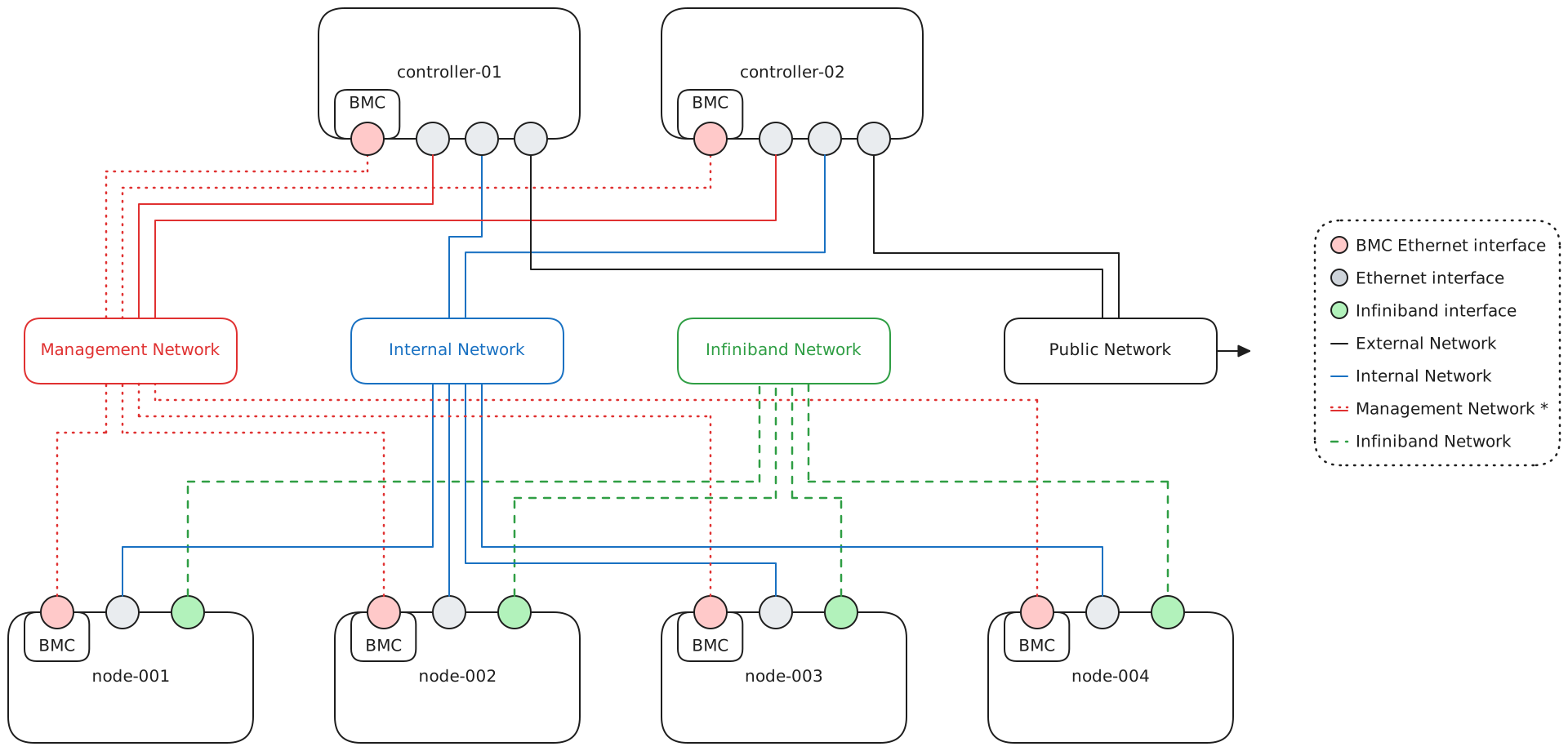
We can see from the diagram that controller servers should have both a regular interface and the BMC interface plugged to the Management Network, this is a requirement to enable the STONITH capability of pacemaker, automatically shutting down a server that suffered a partial fault in order to prevent the propagation of such faul to other machines. If the BMC interface is a combined LAN/BMC interface only a single connection from such interface is required.
Fencing
TrinityX allows for fencing shared resources through the option 'enable_ipmilan_fencing'. This however relies on having the credentials correctly configured on the controllers' BMC-s where the supplied BMC user, through 'fence_ipmilan_login', has sufficient permissions to control a controller's power. Consider setting 'enable_ipmilan_fencing' to False if this requirement cannot be met.Note
It is NOT possible to upgrade a single controller setup into an HA setup! Please make sure to select the right path going forward.Network requirements and configuration
Please refer to nmcli nmcli for more information.
Both interfaces must be online and have the public and internal cluster network configured. In this example we will assume a 192.168.* as public and 10.141.255.254 as cluster network. Note you will need the device names in future steps (i.e. firewall configuration)
# nmcli con show
NAME    UUID                                  TYPE      DEVICE
ens224  3c189b94-b495-41c8-b7cd-b42615e107df  ethernet  ens224
ens192  b2bcb35f-5779-40bd-9da0-e4f4021c388b  ethernet  ens192
The network interface ens224 (internal cluster network) is not yet configured:
# ip a
2: ens192: <BROADCAST,MULTICAST,UP,LOWER_UP> mtu 1500 qdisc mq state UP group default qlen 1000
    link/ether 00:50:56:b3:e9:0a brd ff:ff:ff:ff:ff:ff
    altname enp11s0
    inet 192.168.164.98/24 brd 192.168.164.255 scope global noprefixroute ens192
       valid_lft forever preferred_lft forever
    inet6 fe80::250:56ff:feb3:e90a/64 scope link noprefixroute
       valid_lft forever preferred_lft forever
3: ens224: <BROADCAST,MULTICAST,UP,LOWER_UP> mtu 1500 qdisc mq state UP group default qlen 1000
    link/ether 00:50:56:b3:68:d3 brd ff:ff:ff:ff:ff:ff
    altname enp19s0
    inet6 fe80::466f:51f5:9923:ec8/64 scope link noprefixroute
       valid_lft forever preferred_lft forever
To add:
# nmcli connection modify ens224 ipv4.method manual ipv4.address 10.141.255.254/16
Both interfaces are now up and have an address assigned:
# ip a
2: ens192: <BROADCAST,MULTICAST,UP,LOWER_UP> mtu 1500 qdisc mq state UP group default qlen 1000
    link/ether 00:50:56:b3:e9:0a brd ff:ff:ff:ff:ff:ff
    altname enp11s0
    inet 192.168.164.98/24 brd 192.168.164.255 scope global noprefixroute ens192
       valid_lft forever preferred_lft forever
    inet6 fe80::250:56ff:feb3:e90a/64 scope link noprefixroute
       valid_lft forever preferred_lft forever
3: ens224: <BROADCAST,MULTICAST,UP,LOWER_UP> mtu 1500 qdisc mq state UP group default qlen 1000
    link/ether 00:50:56:b3:68:d3 brd ff:ff:ff:ff:ff:ff
    altname enp19s0
    inet 10.141.255.254/16 brd 10.141.255.255 scope global noprefixroute ens224
       valid_lft forever preferred_lft forever
    inet6 fe80::466f:51f5:9923:ec8/64 scope link noprefixroute
       valid_lft forever preferred_lft forever
Compute nodes
The machines that will be used as compute nodes are expected to have at least 1 interface:
- one interface for the private (internal) interface, used for provisioning and general cluster communications. Note This interface could also be an InfiniBand interface (i.e. boot-over-IB).
The compute nodes can be provisioned with or without local storage (diskless). When not configured for local storage a ramdisk will be used to store the base image. In that case, make sure to take into account the space of the OS image (which depends on its exact configuration) in your memory calculations. Typical images are around 4 GiB in size.
Compute node configuration
Compute node configuration is done through Luna. Please refer to post-installation tasks.
(Trix) External FQDN in favor of Open OnDemand/OOD portal
Please see detailed OOD information
Incorrect or incomplete information will increase the chance of a non-functioning portal