AlertX — Architecture, Alerting & Node-Draining
Component: AlertX (TrinityX monitoring, alerting & NHC auto-draining)
Source: alertx (development), with the deployment role from trinityx-combined (development, site/roles/trinity/alertx) and the GUI from trinityx-ood (development, alertx/)
Introduced: TrinityX 15
Scope — How AlertX fits together: the
alertxCLI and the AlertX OnDemand GUI, the luna2-daemon Prometheus-rule plugins that are the single source of truth, the Prometheus/Alertmanager monitoring stack, and the AlertX drainer that turns NHC alerts into Slurm node drains. For day-to-day usage, see the AlertX admin guide; this page is the developer/integrator architecture view.
1. Overview & design philosophy
AlertX is TrinityX's unified monitoring + alerting + node-health system. It wraps Prometheus, Alertmanager, a set of in-house exporters, and a rule engine, and adds NHC (Node Health Checking) that automatically drains unhealthy nodes from the Slurm queue.
Its guiding idea is a single source of truth for rules. Classic NHC tools keep their own health checks separate from the monitoring system, so the two drift: nodes get drained without an alert, or alerts fire without draining. AlertX defines each rule once — the same rule both raises an alert and (if flagged) drains the node. Because metrics are collected continuously, a node's problem is visible the moment it occurs, rather than discovered by a periodic trial-and-error health probe.
1.1 Design principles
- One rule set, two outcomes. Every rule lives in Prometheus; a rule labelled
nhc: trueadditionally drives draining. Alerting and remediation never disagree because they read the same rule. - The daemon owns the rules. Both the CLI and the GUI are thin front-ends; the luna2-daemon stores the rule configuration and renders the Prometheus rule files (§6). Edit anywhere, converge everywhere.
- Three rule domains. Generic (OS-level), Services (required daemons), and Hardware (auto-generated per node) — see §3.
- Pull, don't trust. The drainer polls Alertmanager for the current truth and reconciles Slurm state every cycle, tagging only its own drains so it never fights a manual drain (§8).
- Opt-in remediation. Draining only runs when the workload manager is Slurm; NHC is a subset of rules, so an alert drains a node only if its rule explicitly enables NHC.
2. Architecture & components
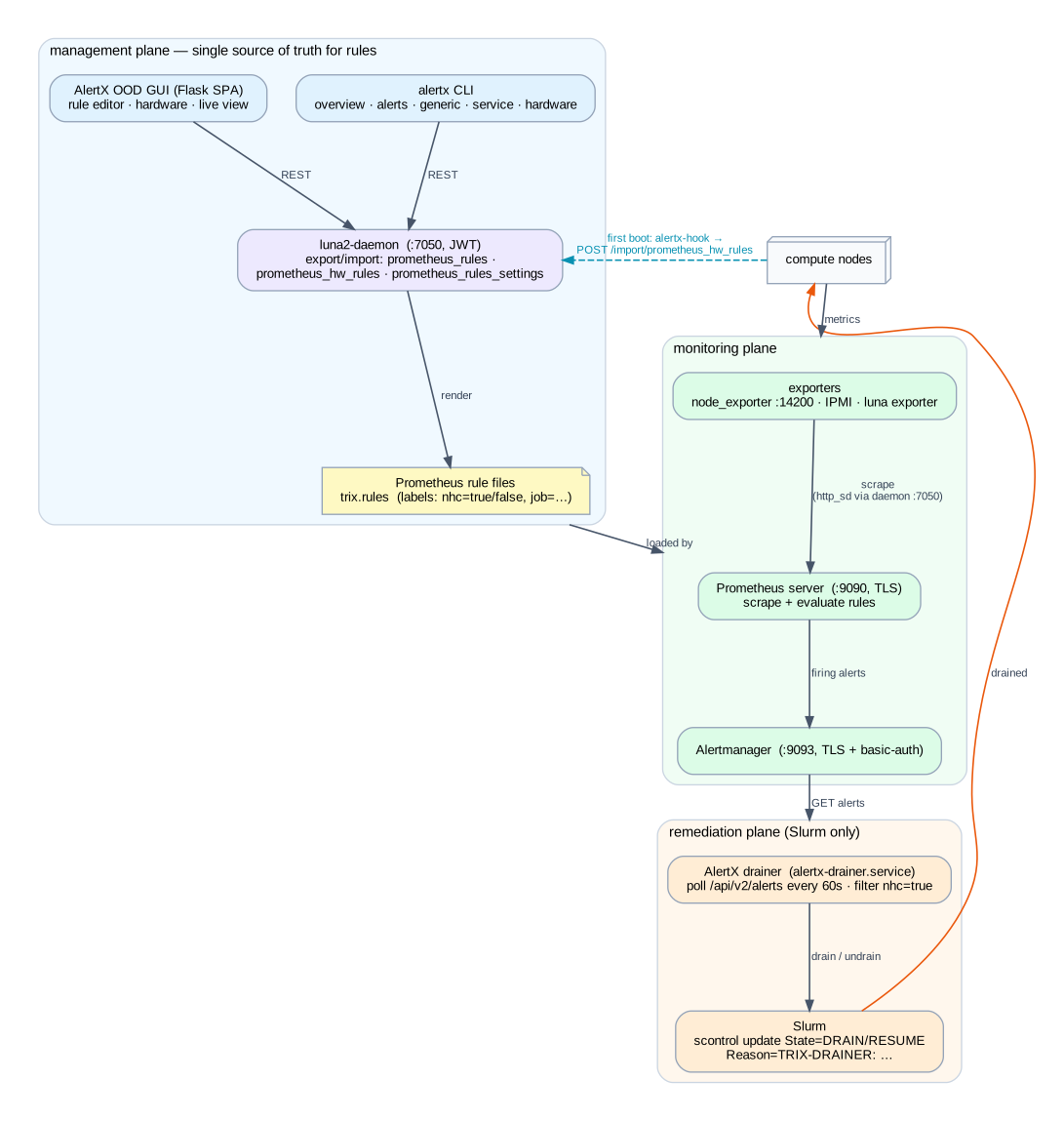
AlertX spans three planes:
- Management plane — the
alertxCLI (§4) and the AlertX OOD GUI (§5) edit rules through the luna2-daemon's import/export plugins (§6), which render the Prometheus rule files. This is the single source of truth. - Monitoring plane — exporters feed Prometheus, which scrapes targets (discovered via the daemon), evaluates the rules, and pushes firing alerts to Alertmanager (§7).
- Remediation plane — the AlertX drainer reads firing NHC alerts from Alertmanager and drains/undrains nodes in Slurm (§8).
2.1 Components & ports
| Component | Where | Listen / port | Notes |
|---|---|---|---|
alertx CLI |
controller | — | talks to daemon :7050, Prometheus :9090, Alertmanager :9093 |
| AlertX OOD GUI | controller (OnDemand) | via OnDemand Passenger | Flask SPA; same backends as the CLI |
| luna2-daemon | controller | :7050 (REST, JWT) |
hosts the prometheus_* import/export plugins + scrape http_sd |
| Prometheus server | controller | :9090 (HTTPS, TLS) |
scrape + rule evaluation |
| Alertmanager | controller | :9093 (HTTPS, TLS + basic-auth) |
alert routing; cluster peer :6783 |
| node_exporter | every node | :14200 |
base node metrics (note: not the default 9100) |
| IPMI / luna exporters | controller / nodes | — | hardware + cluster metrics |
| AlertX drainer | controller | no listen port | alertx-drainer.service; outbound poll every 60 s; Slurm only |
| alertx-hook | every node | — | alertx-hook.service, oneshot at first boot (§9) |
Source note (development branch). Alertmanager still defines a legacy
alertx-drainerwebhook receiver pointing at:7150/listener, but no service listens there — the live mechanism is the drainer polling Alertmanager's/api/v2/alerts(§8). Treat the webhook wiring as vestigial.
3. Rule domains (Generic · Services · Hardware) and NHC
A rule is a Prometheus alerting rule plus AlertX metadata. AlertX organises them into three domains:
| Domain | CLI | What it covers | Typical source |
|---|---|---|---|
| Generic | alertx generic |
OS-level conditions (CPU/IPMI faults, memory, filesystem, load) | hand-configured |
| Services | alertx service |
required daemons up (slurmd, sshd, sssd, rsyslogd …) |
hand-configured |
| Hardware | alertx hardware |
per-node hardware baseline (counts, models, sizes) | auto-generated on first boot and resettable after a hardware change |
Two labels carried on the rendered rules drive behaviour:
nhc: truemarks a rule as NHC-enabled — a firing alert for it will drain the affected node. Rules without it (ornhc: false, e.g.LunaDaemonProblemsOnControllers) only alert. NHC is a strict subset of the rules.job=luna_controllersidentifies a controller rule. A firing NHC controller rule drains every node in the cluster — the idea being that a controller-side problem (e.g. an exported/homefilling up) affects all nodes (§8).
4. The AlertX CLI
alertx (the alertx repo, development, v1.0) is the scriptable front-end. main.py builds an argparse tree from five classes; each is a sub-command:
| Sub-command | Class | Purpose |
|---|---|---|
alertx overview |
Overview |
dashboard summary of cluster + alert state |
alertx alerts [silent] |
Alerts |
list/filter firing alerts; silence an alert |
alertx generic [show/add/change/remove] |
Generic |
manage Generic rules |
alertx service [show/add/change/remove] |
Service |
manage Services rules |
alertx hardware [global/reset] |
Hardware |
list per-node hardware rules; edit global settings; reset a node's baseline |
Cross-cutting flags: -e/--edit (open the rule as JSON, or YAML, in $EDITOR), -X/--sortby, -v/--verbose, -V/--version, plus per-command filters and bash completion (shtab).
Backends. alertx.utils.rest.Rest talks to three endpoints:
- luna2-daemon (
:7050, JWT) — rule CRUD via theprometheus_rules/prometheus_hw_rules/prometheus_rules_settingsplugins, and/config/nodefor the node list (§6). - Prometheus (
:9090) —GET /api/v1/query?query=max by(hostname)(up)for node up-state andGET /api/v1/rulesfor live rule status. - Alertmanager (
:9093, basic-auth) —GET /api/v2/alertsfor the firing alerts shown byalertx alerts.
Config & auth. Config lives under /trinity/local/alertx/cli/config/ — alertx.ini (logging), luna.ini (the [API] daemon endpoint + credentials + SECRET_KEY), and a cached token.txt. Auth is the same JWT scheme as the luna2 utilities: POST /token → cache the JWT → send x-access-tokens: <jwt> on every daemon call. Alertmanager basic-auth credentials are read from /etc/trinity/passwords/prometheus/ (filename = user, contents = password). Rest().daemon_validation() runs before every command.
5. The AlertX OOD GUI
The GUI (trinityx-ood, development, alertx/) is the point-and-click counterpart of the CLI: a Flask app served as an Open OnDemand Passenger app, fronting a compiled Vite single-page app. passenger_wsgi.py exposes app from app.py; OnDemand mounts it under its per-app prefix (tile AlertX, category Monitoring).
It uses the same luna2-daemon backend as the CLI (rest.py), so the GUI and CLI are interchangeable editors of one rule set:
| Route | Backend call (luna2-daemon) | Purpose |
|---|---|---|
/get_rules / /save_config |
export / import prometheus_rules |
generic + service rule editor |
/get_nodes / /save_nodes |
/config/node + export/import prometheus_hw_rules |
per-node hardware health checks |
/get_global / /set_global |
export/import prometheus_rules_settings |
global hardware-rule settings |
/proxy, /proxy_post |
(client-side) | CORS proxy to Prometheus :9090 / Alertmanager :9093 for the live view |
/ |
— | serves the SPA, injecting PROMQL_URL, APP_URL, ALERT_URL |
Auth is the same JWT-from-luna.ini scheme (/token → x-access-tokens), here using the OnDemand luna.ini path. The live alerts/PromQL view is rendered client-side in the browser, reaching Prometheus/Alertmanager through the Flask /proxy endpoints (Alertmanager credentials injected from the passwords dir).
6. The luna2-daemon backend — single source of truth
Neither front-end writes rule files directly. Both call the luna2-daemon's import/export plugin endpoints; the daemon stores the configuration in the luna database and renders the Prometheus rule files (trix.rules, plus a status-detail file). Editing from the CLI on one controller and the GUI on another therefore converges through the daemon (and replicates across HA controllers like any other daemon state).
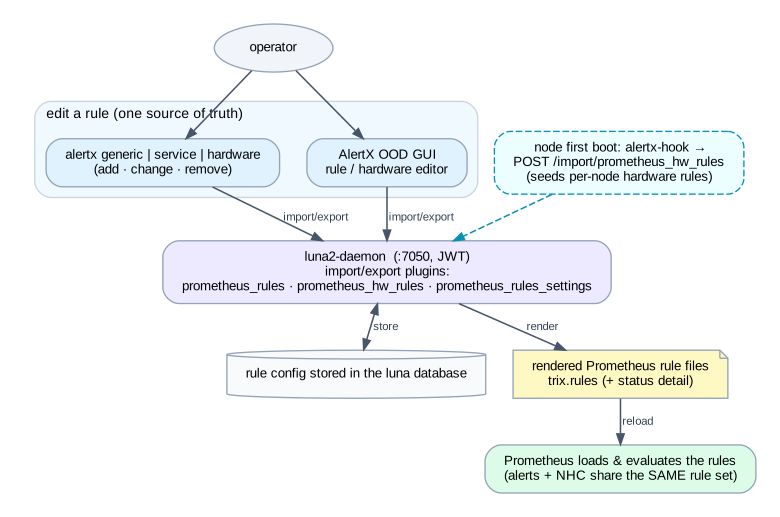
| Daemon endpoint | Used for |
|---|---|
GET /export/prometheus_rules · POST /import/prometheus_rules |
Generic + Services rule definitions |
GET /export/prometheus_hw_rules · POST /import/prometheus_hw_rules |
per-node Hardware rules |
GET /export/prometheus_rules_settings · POST /import/prometheus_rules_settings |
global hardware-rule settings |
GET /config/node |
node list (to attach hardware rules) |
GET /export/prometheus |
Prometheus scrape targets (http_sd) for the luna_nodes / luna_controllers jobs |
POST /token |
issue the JWT used by both front-ends |
These plugins are the luna2-daemon plugins/export/prometheus* and plugins/import/prometheus* modules; they must be listed in the daemon's ALLOWED_EXPORTERS / ALLOWED_IMPORTERS. Because the scrape targets are served by /export/prometheus (http_sd), Prometheus always scrapes exactly the nodes luna knows about — node membership and monitoring stay in lock-step.
7. The monitoring pipeline
   exporters            Prometheus (:9090)            Alertmanager (:9093)
   ─────────            ──────────────────            ────────────────────
   node_exporter :14200 ─┐
   IPMI exporter        ─┼─ scrape (TLS) ──▶ evaluate rules ──▶ firing alerts ──▶ route
   luna exporter        ─┘   targets via             (trix.rules,                 (TLS +
   (per node + ctrl)        http_sd  daemon :7050     nhc / job labels)            basic-auth)
- Scraping. Prometheus discovers targets through the daemon's
http_sdendpoint (/export/prometheus) for theluna_nodesandluna_controllersjobs, plus static/file-SD jobs. Thejob=luna_controllerslabel is just the controller scrape-job name — the same label the drainer keys its global-drain on (§8). - Evaluation. Prometheus loads the rendered rule files and evaluates them; matching series raise alerts carrying the
nhcandjoblabels and anannotations.descriptionreason. - Routing. Firing alerts are pushed to Alertmanager over TLS with basic-auth. Alertmanager is the queryable source of currently active alerts for the CLI, the GUI live view, and the drainer.
8. NHC — automatic node draining
The drainer (alertx-drainer.service, from the trinityx-combined alertx role) is a Python loop — not a webhook receiver. It only runs when the workload manager is Slurm (alertx_drainer_enable). Every DRAIN_INTERVAL (default 60 s) it reconciles active NHC alerts against Slurm node state.
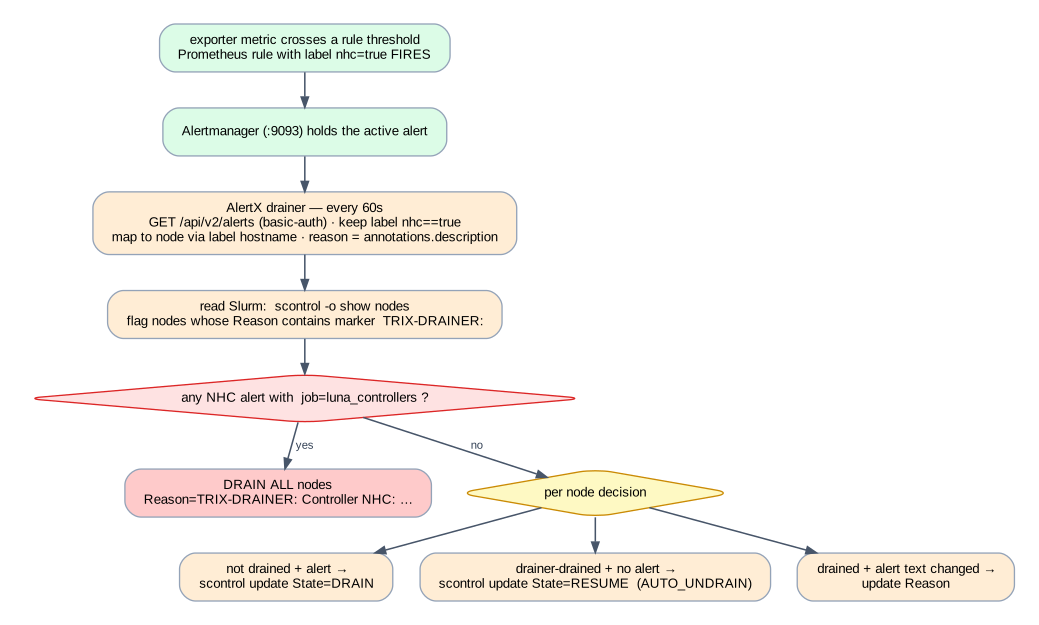
Each cycle:
- Pull alerts —
GET https://localhost:9093/api/v2/alerts(basic-auth), keep only alerts with labelnhc=="true", map each to a node by itshostnamelabel, take the reason fromannotations.description. - Read Slurm —
scontrol -o show nodes; a node counts as drainer-drained only if itsStatecontainsDRAINand itsReasoncontains the markerTRIX-DRAINER:. This is how the drainer never touches a manually-drained node. - Controller rule first — if any active NHC alert has
job=="luna_controllers", drain every node (Reason=TRIX-DRAINER: Controller NHC: …) and skip per-node logic this cycle. - Per node — not-drained + alert → drain; drainer-drained + no alert → resume (when
AUTO_UNDRAIN); drained + changed reason → update reason.
The exact Slurm commands (reason always marker-prefixed):
scontrol update NodeName=<node> State=DRAIN  Reason=TRIX-DRAINER: <reason>
scontrol update NodeName=<node> State=RESUME
scontrol update NodeName=<node> Reason=TRIX-DRAINER: <new reason>
Because the drainer pulls the truth and tags its own work, it is self-healing: an alert that clears auto-undrains the node next cycle; a controller alert that clears releases the cluster.
9. Hardware-rule seeding at first boot
Hardware rules are per-node and derive from the node's actual hardware, so they are generated the first time a node boots:
- The node runs the oneshot
alertx-hook.service→/usr/local/sbin/alertx-hook.sh. - The hook reads the node's
luna.ini, fetches a TPM-bound JWT (POST {LUNA_URL}/tpm/<host>on:7050), then callsPOST {LUNA_URL}/import/prometheus_hw_ruleswith[{"hostname": "<fqdn>", "force": false}](retry/back-off). - The luna2-daemon generates that node's hardware Prometheus rules; Prometheus picks them up, and from then on hardware faults on the node alert (and drain, if NHC-enabled).
alertx hardware reset (CLI) or the GUI re-baselines a node after an intentional hardware change, so the rules match the new configuration instead of alerting on the difference.
10. End-to-end example & reference
Adding a rule that drains on a CPU fault
alertx generic add -e(or the GUI rule editor) → the rule is sent toPOST /import/prometheus_rules, labellednhc: true.(management plane)- The luna2-daemon stores it and renders
trix.rules; Prometheus reloads.(§6) - A node's IPMI exporter reports a processor fault; Prometheus evaluates the rule and the alert fires with
nhc=true,hostname=<node>.(§7) - Alertmanager holds the alert; the drainer's next 60 s poll sees it.
(§8) - The drainer runs
scontrol update NodeName=<node> State=DRAIN Reason=TRIX-DRAINER: <description>. The node stops accepting new jobs.(§8) - The fault is fixed, the alert clears; the next cycle runs
scontrol update NodeName=<node> State=RESUME.(§8)
Quick reference
| I want to… | Look at |
|---|---|
| Add/change an alert rule | alertx generic/service or the GUI → daemon import/prometheus_rules (§4, §6) |
| Re-baseline a node's hardware rules | alertx hardware reset → import/prometheus_hw_rules (§9) |
| See what's firing | alertx alerts / GUI live view → Alertmanager /api/v2/alerts (§4) |
| Understand a drain | check the node's Reason for TRIX-DRAINER:; the drainer logs to /var/log/alertx (§8) |
| Enable/disable auto-draining | the alertx role's alertx_drainer_enable (Slurm only) + per-rule nhc flag (§8, §3) |
| Change scrape targets | they follow luna node membership via daemon /export/prometheus (§6, §7) |
Source: alertx, trinityx-combined (site/roles/trinity/alertx) and trinityx-ood (alertx/), all on development.