DHCP addressing: pools and reservations
Luna hands out addresses and boot instructions over DHCP. It generates the configuration for its DHCP server — Kea or ISC dhcpd — from each network's settings. This page explains how a Luna network turns into that configuration: what the address pool (range) is for, how it relates to the node reservations, and why the pool can stay small on all but one addressing model.
One network, one subnet
Each Luna network maps to one DHCP subnet. On that network you decide three things:
- whether DHCP is served at all (
dhcp), - the dynamic pool — a band of addresses Kea may hand out on its own
(
dhcp_range_begin/dhcp_range_end), - how known nodes are addressed: by a fixed reservation, from the pool, or reservations
only (
dhcp_nodes_in_pool/dhcp_nodes_only).
With dhcp disabled, the subnet is still declared but nothing is served on it.
Reservations and the pool
In the default model every node interface that Luna knows — that is, every interface with a MAC address — is written into the DHCP server as a host reservation: a permanent binding of that MAC to that IP. The node gets the same address every time it boots, fixed in Luna's database rather than leased. Reserved addresses are assigned from the low end of the subnet upward.
The pool is a separate, bounded band of addresses elsewhere in the subnet. The DHCP server draws from it only for unidentified clients: a machine whose MAC Luna does not yet recognise — a brand-new node being discovered, before it has been added and given a reservation. Reservations live outside the pool and consume none of it.
For example, the default cluster network 10.141.0.0/16 numbers nodes from 10.141.0.1
upward, places the controller at 10.141.255.254, and sets the pool to a band in between
(such as 10.141.128.0–10.141.140.0).
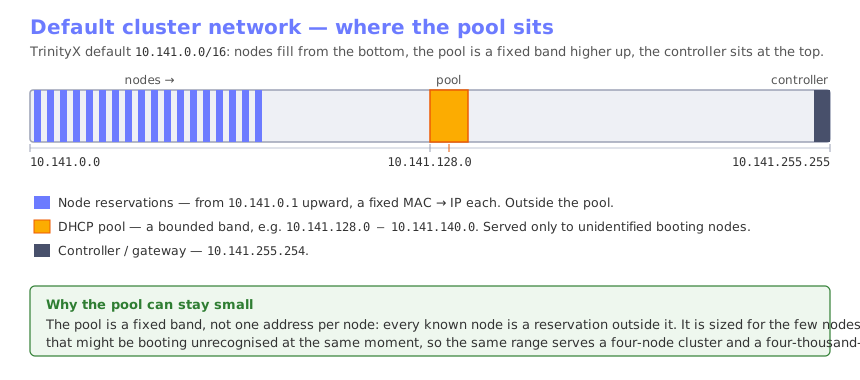
This is why the pool can stay small no matter how large the cluster is. It is a fixed band, sized for the handful of never-seen nodes that might be booting unrecognised at the same moment, not for the node count — every known node is a reservation outside it. The same range serves a four-node cluster and a four-thousand-node one.
Note
The subnet, where the pool sits within it, and how large the pool is are all chosen when TrinityX is installed and configured, and vary from one cluster to the next. The addresses above are only an example of a default layout.DHCP on a node interface
The dhcp flag on a node or group interface controls how the node's operating system
brings that interface up. With dhcp set, Luna renders the node's network configuration
— a NetworkManager keyfile, or netplan on Ubuntu — to configure the interface
automatically over DHCP (method=auto) rather than writing a static address into the
image. With it unset, the interface is configured statically with its assigned address.
luna node changeinterface <node> <interface> --dhcp y
On an ordinary network the resulting address is the same either way: the DHCP server answers
the node's request with its host reservation, so the flag decides how the address is
delivered, not what it is. It gains a second effect together with dhcp_nodes_in_pool,
below, where dhcp = yes also means the node draws a lease from the pool instead of keeping
a reservation.
Serving only known nodes
dhcp_nodes_only narrows the network to reservations alone:
luna network change <network> --dhcp_nodes_only y
No dynamic pool is generated — any range values are ignored — and the DHCP server answers only for MAC addresses it has a reservation for. An unknown machine on this network gets nothing. Use it where the network must never address a device Luna has not been told about; the trade-off is that you cannot discover or boot an un-enrolled node on it.
Putting nodes in the pool
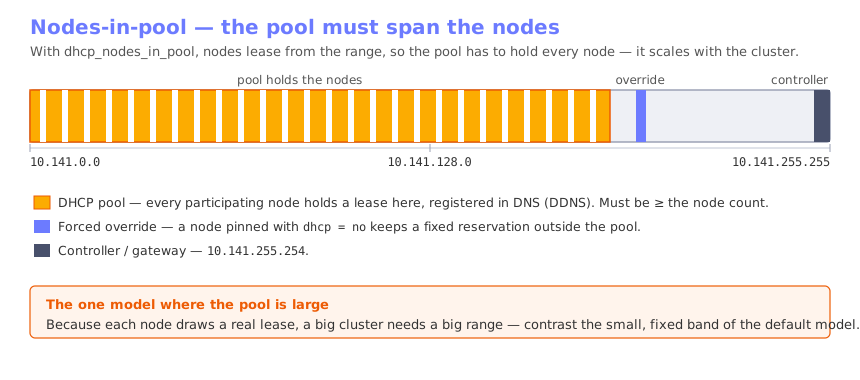
dhcp_nodes_in_pool is the opposite choice. Instead of a reservation, each participating
node takes a real lease from the pool, and Luna registers the leased address in DNS
through dynamic updates (DDNS) so names still resolve. A node's configured IP is ignored in
this model — its address comes from the range.
luna network change <network> --dhcp_nodes_in_pool y
Because every participating node now holds a lease, the pool is no longer a small discovery band: it must be at least as large as the number of pooled nodes, with headroom for lease churn. This is the one model where a big cluster needs a big range.
Note
dhcp_nodes_only and dhcp_nodes_in_pool are mutually exclusive.
Luna rejects a request that would enable one while the other is set; disable the first
before enabling the second.
Forcing a single node to stay fixed
Even on a dhcp_nodes_in_pool network you can hold one node on a fixed address. Setting
dhcp to no on that node's interface takes it out of the pool: it keeps its configured
IP and is written as an ordinary reservation, while the rest of the network still draws
leases.
luna node changeinterface <node> <interface> --dhcp n
Shared networks: host and BMC on one segment
A network can be shared on top of another, so that two Luna networks occupy the same
physical segment while remaining separate networks. It is set with --shared, naming the
base (carrier) network:
luna network change ipmi --shared cluster
Its most common use is in-band BMC management: a node's host interface and its BMC sit on
the same physical network — often the very same NIC or switch port, or at least the same
wire or VLAN — while still being two separate Luna networks, such as cluster for the
hosts and ipmi for the BMCs. The BMC is reached in-band, over that shared segment,
rather than on a dedicated management network.
To serve both from one segment, Luna renders the shared networks into a single DHCP
shared-networks block and fences each subnet's pool by client class. A device that
presents the udhcp vendor-class identifier — the in-band DHCP client a BMC or a
netbooting node uses — is matched into the shared network's pool; other requests fall
through to the base network. Each device is therefore served an address from the correct Luna
network even though both live on the same wire.
Note
A shared network is also the basis for reaching a subnet behind a relay — see DHCP relay on shared networks. The relay case selects the subnet by relay source instead of by theudhcp client class.
Resizing the pool over addresses already in use
When you enable DHCP on a network, or move or grow the pool so that it now covers addresses that were already assigned to node interfaces, those interfaces cannot keep an address that sits inside the dynamic range — the DHCP server would be free to lease the same address to another client. Luna therefore reassigns each affected interface to the next free address outside the pool, then reloads DNS and restarts the DHCP server. The nodes return on new, stable addresses.
The exception is an interface that is itself DHCP-driven (dhcp set to yes on a
DHCP-enabled network): its address is meant to come from the pool, so Luna leaves it in
place. This is precisely the nodes-in-pool case — every pooled node's interface is set
to dhcp = yes, so none of them are moved, because sitting inside the pool is the point. A
node you have pinned with dhcp = no is static again, and is moved out of the way like any
other reservation.
Luna also keeps the pool from crowding out static addresses: a change that would leave too few addresses for the nodes already configured is rejected, and outside the nodes-in-pool model Luna keeps the pool to a modest fraction of the subnet.
Settings at a glance
| Setting | Level | Effect |
|---|---|---|
dhcp |
network | Serve DHCP on the subnet at all. Off — subnet declared, nothing served. |
dhcp_range_begin / dhcp_range_end |
network | The dynamic pool. By default used only for unidentified booting nodes. |
dhcp_nodes_only |
network | Reservations only, no pool. Unknown MAC gets nothing. |
dhcp_nodes_in_pool |
network | Nodes lease from the pool and are registered in DNS (DDNS). Pool must be large. |
dhcp |
node / group interface | Node's OS brings the interface up over DHCP (method=auto) instead of a static address. On a pool network, yes also = lease from pool, no = keep a fixed reservation. |
Changing any of these regenerates the DHCP server configuration and restarts the service automatically (and reloads DNS) — there is no manual apply step. Adding or changing nodes does the same.