Static network routes
Luna keeps a reusable catalog of static routes. A route is defined once, then coupled to one or more networks, groups or nodes. At provisioning time luna resolves the routes that apply to a node and renders them into that node's network configuration (netplan for Ubuntu, NetworkManager keyfiles for RHEL-family images).
Static routes are available from Luna 2.1u8 (August 13 2026) and higher.
Note
Routes are a catalog plus couplings. Editing a route in the catalog updates every network, group and node it is coupled to — you never repeat the route body.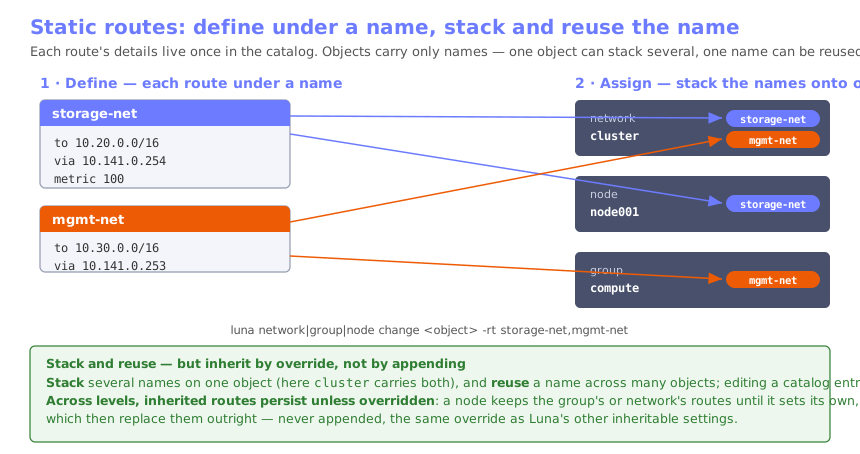
The route catalog
List, show, add, change and remove routes with luna network route:
luna network route list
luna network route show <name>
luna network route add <name> -D <destination> -g <gateway> [-m <metric>] [-dev <device>] [-c <comment>]
luna network route change <name> [-D ...] [-g ...] [-m ...] [-dev ...] [-N <newname>]
luna network route remove <name>
A route has these fields:
| Field | Flag | Meaning |
|---|---|---|
| Destination | -D / --destination |
Target network or host in CIDR, e.g. 10.0.0.0/8 or 192.0.2.5/32 |
| Gateway | -g / --gateway |
Next-hop IP. Optional when a device is given |
| Metric | -m / --metric |
Route metric (priority) |
| Device | -dev / --device |
Interface name, or BOOTIF for the provisioning interface. Optional |
| Comment | -c / --comment |
Free-text note |
Example — a route to a storage network via a next-hop gateway:
luna network route add storage-net -D 10.20.0.0/16 -g 10.141.0.254 -m 100 -c "to storage fabric"
Coupling routes
Couple catalog routes to a network, group or node with -rt / --routes. The value is
a comma-separated list of route names; pass "" to clear the coupling at that level. You
can stack several routes on one object by listing their names, and reuse the same
route on any number of objects — the route body itself is never duplicated.
luna network change <network> -rt storage-net,mgmt-net   # stack two routes on one network
luna group   change <group>   -rt storage-net            # reuse the same route on a group
luna node    change <node>    -rt storage-net,extra-net  # stack a reused and a node-specific route
luna node    change <node>    -rt ""                      # clear this node's own routes
How routes are resolved for a node
Couplings follow a strict override precedence, identical to how interfaces are resolved:
node overrides group overrides network
The most specific scope that has any coupled routes wins outright; luna does not merge across scopes. So a node with its own routes ignores its group's and network's routes; a node with no routes inherits the group's; a node and group with none inherit the network's.
In luna node show / luna group show the resolved routes are shown with their source:
a value owned at that scope is marked with routes *, an inherited value shows
value (source), and no routes shows None.
What gets rendered at boot
For each resolved route luna writes a static route into the node's network configuration:
- Ubuntu / netplan — a
routes:entry withto:,via:and, when the next-hop is outside the interface's own subnet,on-link: trueso the kernel installs the route without requiring the gateway to be directly connected. - RHEL family / NetworkManager — a
route<n>=line in the interface keyfile.
Note
`on-link: true` is emitted for netplan only. NetworkManager installs an off-link next-hop without an extra flag, so its keyfiles carry the plain route.Verifying on a node
After a node has provisioned, confirm the routes are present:
ip route show
Each coupled destination should appear via its configured gateway and metric.