Workload management
Slurm is sourced from the OpenHPC stack. This document may also apply for custom slurm installations and through Epel.
SLURM
TrinityX is configured to use the default paths for SLURM. The configuration directory /etc/slurm is shared on all the nodes but links to /trinity/shared/etc/slurm where all the files reside.
For better readability, the files have been split up and included from the main slurm.conf file.
| File | Description |
|---|---|
| slurm.conf | Main configuration file |
| slurm-nodes.conf | Slurm node configuration file - generated and managed through automation |
| slurm-partitions.conf | Partition configuration - generated and managed through automation, like slurm-nodes.conf |
| gres.conf | Slurm generic resource (GRES) configuration file, e.g. GPUs - generated and managed through automation, like slurm-nodes.conf |
| slurmdbd.conf | Slurm Database Daemon (SlurmDBD) configuration file ([see slurmdbd.conf(https://slurm.schedmd.com/slurmdbd.conf.html)]) |
| cgroup.conf | Slurm configuration file for the cgroup support (see cgroup.conf) |
| acct_gather.conf | Slurm configuration file for the acct_gather plugins (see acct_gather.conf) |
| slurm-health.conf | Health check configuration (where applicable) |
| topology.conf | Slurm configuration file for defining the network topology (see topology.conf) |
| slurm-user.conf | Slurm user configuration file (e.g. QoS, priorities) |
By default Luna generates the configuration for nodes and partitions, where the partition is based on the group name. This method is useful for homogeneous node-type cluster where a default node contains the detailed configuration for CPU-s, cores and RAM. When more complexity is desired, e.g. having different node-types, the automation can be overridden by manually configuration in these files, or the graphical slurm configurator can be used.
Graphical slurm configuration application
The graphical slurm configurator in action:
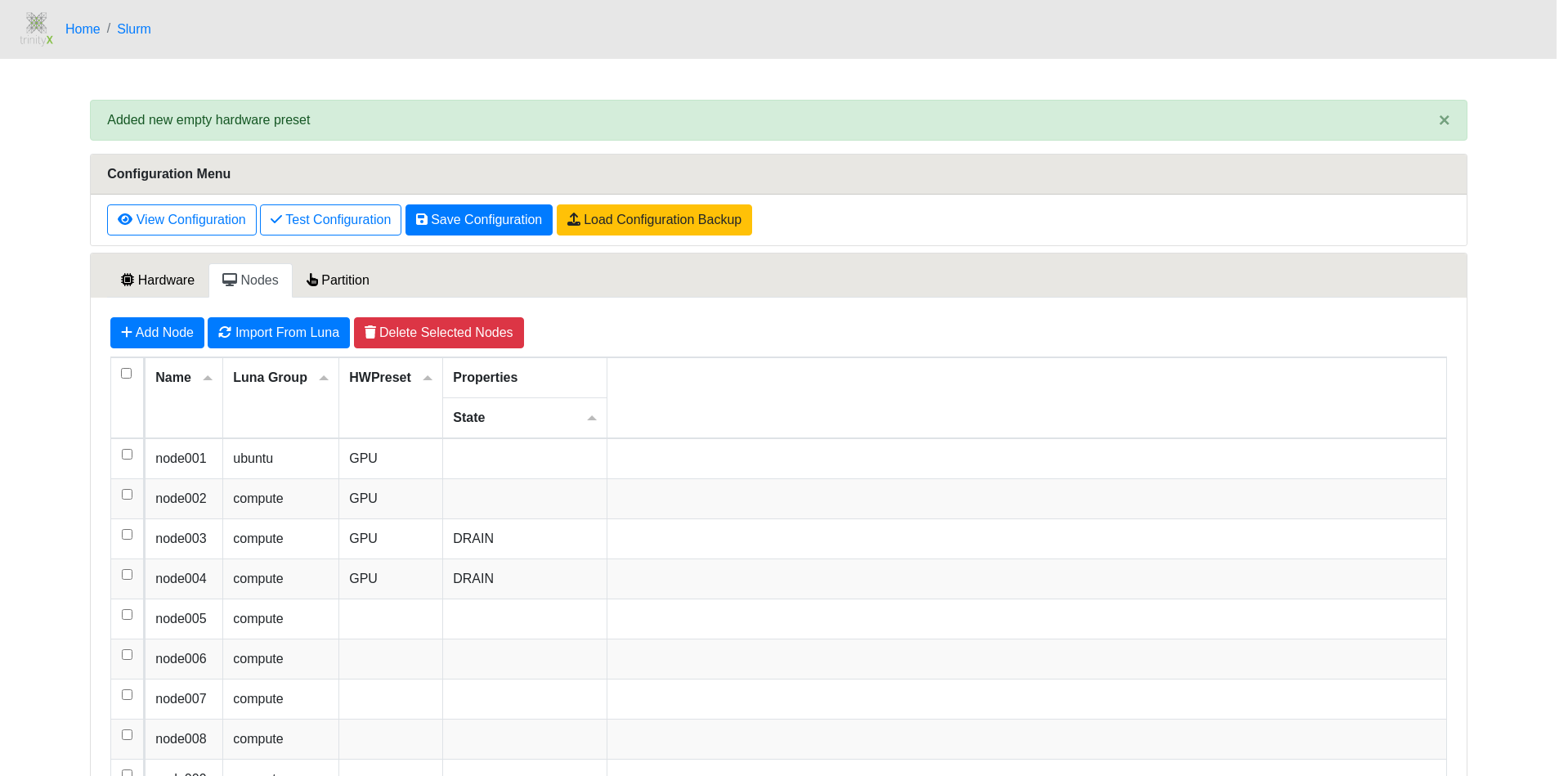
Short guidance: There are three main sections: 'Hardware', 'Nodes' and 'Partitions'. 'Hardware' allows for configuring presets or properties that can be selected for nodes in 'Nodes' and 'Partitions'. Both 'Nodes' and 'Partitions' sections allow for further tailoring of properties. After configuring what's preferred, a configuration can be tested for syntax validity and previewed before saving. For each save a backup is created and can be loaded to revert changes.
Automation versus Configuration
The order of configuration is as follows:
- Luna configures slurm. This is an automated process
- More advanced configuration done through the Slurm Graphical configurator
- Custom configuration
Luna configures
Luna configures the nodes and groups based on luna config by default. It adheres to the block:
# TrinityX will only manage inside 'TrinityX Managed block'.
# If manual override is desired, the 'TrinityX Managed block' can be removed.
#### TrinityX Managed block start ####
NodeName=node003 # GroupName=compute
NodeName=node002 # GroupName=compute
NodeName=node001 # GroupName=compute
NodeName=node004 # GroupName=compute
#### TrinityX Managed block end   ####
There are no automated changes outside the clearly listed managed blocks. This would allow for some additional configuration if the administrator sees the need for it.
Configuring minimal defaults
The presented catch-all default does not render a valid configuration and won't enable nodes for jobs. This is intentional to prevent an accidental working but wrong configuration.When luna automation is desired, it is important to configure the top default line:
NodeName=DEFAULT Boards=1 SocketsPerBoard=1 CoresPerSocket=1 ThreadsPerCore=1 RealMemory=100 State=UNKNOWN
Slurm Graphical configurator
When using the Slurm Graphical configurator, it'll ask you to confirm using this approach from now on. This typically happens only once after which the managed blocks will be changed to show that the configuration is no longer managed by luna.
The same approach remains as such that no changes are made outside the listed blocks.
Custom configuration
removing the managed blocks altogether will allow for a complete custom configuration. In this case TrinityX relies on the administrator to configure slurm.