Node installer
The TrinityX node installer, lpart, provisions a node from two settings held in Luna: the install mode, which says what should happen to the node's operating system, and the disk layout, which describes the node's disks. Both are set on the group and can be overridden per node. A node that runs from RAM needs no disk layout at all; a node installed to disk is driven entirely by it. Hand-written partition scripts are no longer needed for a local disk, a mirror or a RAID set.
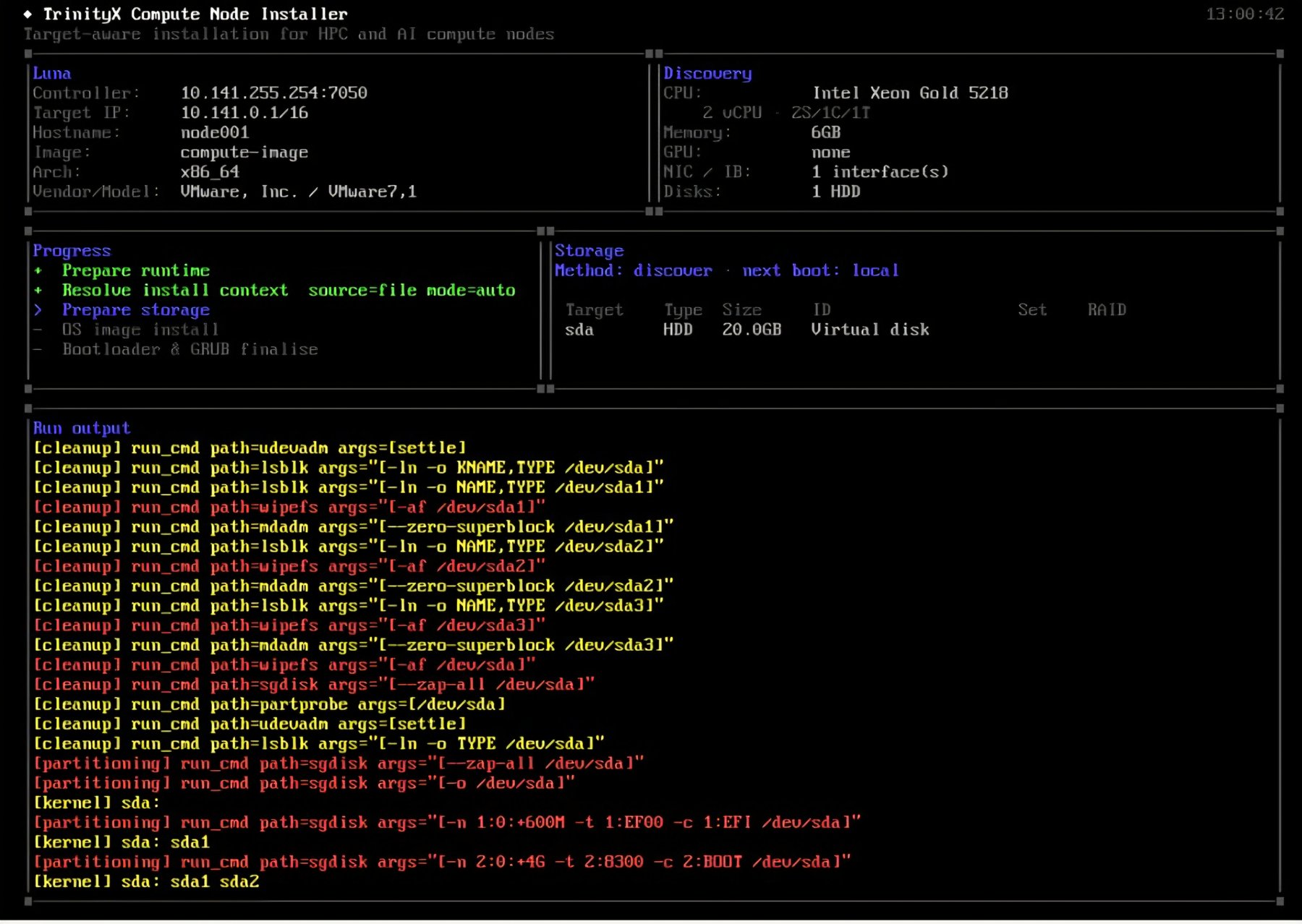
The installer shows its progress on the node's console: the node's identity as Luna knows it, the hardware it discovered, the phases it runs through, the storage it resolved and the commands it runs.
Install mode
The mode is the headline decision. A freshly installed cluster starts in memboot, so a node
runs from RAM and no disk is written until you choose a mode that uses it. auto does the
sensible thing with the disk without supervision; the other modes exist for when you want to be
explicit.
install_mode |
What happens | Destroys data? |
|---|---|---|
auto |
Install if the disk is blank, refresh if it is healthy, repair if it is broken, leave data alone. If no disk layout is declared, run from RAM. | Only the blank or broken parts |
sync |
Refresh the OS on the existing layout. If the disk is not as expected, stop and report instead of wiping. | No |
full |
Wipe and reinstall from scratch. | Yes, on purpose |
local |
Boot the OS already on the disk, fetch nothing. | No |
memboot (default on a new cluster) |
Run the OS from RAM (diskless); mount local data sets if declared. | No |
sanitize |
Securely erase the node's disks, for handing the node to a new tenant. No install. | Yes, on purpose |
legacy |
Run the classic installer with the pre, part and post scripts, as before. | Per the scripts |
auto, sync, full and local use the disk layout. memboot consults it only for data
sets. sanitize and legacy ignore it.
# luna group change compute --install-mode auto
# luna node change node001 --install-mode full
What the modes guarantee:
- A data set is wiped only by an explicit
full, never byautoorsync. - A set marked
persistentis never partitioned, formatted or written by any mode exceptsanitize. It is only mounted. syncnever destroys existing data. On a broken or mismatched disk it halts.automay recreate the OS set, which carries no user data. A broken data set halts.- A declared OS layout that cannot be satisfied — no disks, too few, none matching — halts and reports. The node does not silently fall back to RAM.
Disk layout
A disk layout is a set of sets. A node has at most one OS set, where the system is installed, and any number of data sets for local storage. Each set says which disks to use and how to arrange them, and lists the volumes to create on them.
The layout is stored on the group or the node, in JSON; it can be written in YAML, see the note in Disk layouts: worked examples:
# luna group change compute --disklayout            # opens $EDITOR
# luna group change compute -qdl /root/layout.yaml  # loads a file
# luna group showdisklayout compute
# luna node showdisklayout node001
A layout set on a node replaces the group's layout as a whole; fields are never merged.
Choosing the disks
With selection: discover, the installer finds the disks at boot and matches them by tag and
size, so one group layout fits a fleet whose disks sit in different slots or differ in size.
Every disk is tagged automatically from what the kernel reports: rotary for a spinning disk,
ssd for any solid-state disk, and nvme in addition for NVMe disks. A match may combine:
tags: the disk must carry every tag listed;min_sizeandmax_size: either may be left out;model: the disk model name must contain this text.
An omitted match accepts any disk. From the matching disks the set takes as many members as
its RAID level needs (or the count given), smallest first.
With selection: manual you list the exact device paths under devices. Paths under
/dev/disk/by-path/ or /dev/disk/by-id/ are stable across reboots; /dev/sdX names are not.
A discovered set can be pinned: with save: true the first install writes the disks it
resolved back to the node as a manual layout, and every later boot reproduces exactly those
disks. Clearing the node's layout returns it to the group's recipe.
Arranging the disks
raid |
Arrangement | Disks | Gives you |
|---|---|---|---|
none (default) |
single disk | 1 | one disk, no redundancy |
0 |
stripe | 2 | speed, no redundancy |
1 |
mirror | 2 | redundancy |
5 |
single parity | 4 or 5 | capacity, survives one disk loss |
6 |
dual parity | 5 or more | capacity, survives two disk losses |
10 |
stripe of mirrors | 4 | redundancy and speed |
The OS set does not take parity RAID
An OS set uses 1, 2 or 4 disks withnone, 1, 0 or
10. RAID 5 and 6 are refused for the OS set, because the bootloader cannot reliably
boot a degraded parity array. Data sets take every level.
A redundant set (1, 5, 6 or 10) that is missing a member stops the node with
install.degraded (see When an install stops). Add
allow_degraded: true to the set to let the node keep using it with the disks that are present,
with a warning; the key is refused on a set without redundancy. A new install still needs every
disk: full, or auto recreating the OS set, stops with install.fatal when a member is
missing, with or without allow_degraded.
Choosing the bootloader
By default the node boots from the network every time and the controller decides what it runs.
The OS set can say otherwise with bootloader, which is accepted on the OS set only:
bootloader |
What it is for | On UEFI | On legacy BIOS |
|---|---|---|---|
last — the default when the key is absent |
the controller keeps the boot decision | GRUB and the shim are installed; the node's entry is placed after the network entry | no bootloader is written |
first, grub, yes, true |
the node is meant to run from its own disk, with the network as fallback | the same, but the node's entry is placed first | GRUB is written to the master boot record of every boot disk |
none, no, false |
the node must never start from disk | nothing is written, and an entry left by an earlier install is removed along with the loaders on the EFI partition | no bootloader is written |
A bare true or false works as well as the words; unlike raid, the value is not quoted.
A mirrored OS set gets one boot entry per disk, so the node still boots when either disk is lost.
false means no bootloader, not the default
false and no are spellings of none, so they remove the
bootloader rather than leaving the node as it is today. The value that keeps today's behaviour is
last, or simply leaving the key out.
On legacy BIOS, last and none do the same thing — neither writes a bootloader, and the removal
that none performs exists only under UEFI.
A node with no bootloader must be able to boot from the network
Withnone the disk holds no way to start the installed system, so the node depends on
the network boot working on every boot. Use it where that is deliberate; a node that cannot reach
the controller has nothing to fall back on.
A set with no bootloader also needs an install ramdisk that hands the node over to the installed system at the end of the install, rather than rebooting into a disk that has nothing to start. Every Luna ramdisk does this, whether it is built with dracut or with initramfs-tools. A custom ramdisk that does not is refused before any disk is touched, with the reason given, because such a node would otherwise fall back to the network on every boot for ever.
Some firmware puts the network back in front
A few AMI and Supermicro platforms re-apply their Setup boot priorities at POST, which can push the network entries ahead of the node's own again. The install reads the boot order back and warns when it sees this. The remedy is a firmware setting on the node, not a Luna one.Volumes
A volume is one mountpoint within a set, backed by a provider of partition or lvm, with a
filesystem (vfat, xfs, ext4 or swap) and a size. The common OS volumes have defaults,
so they can be written as bare mountpoints:
| Mountpoint | Filesystem | Provider | Size |
|---|---|---|---|
/boot/efi |
vfat |
partition |
600M |
/boot |
xfs |
partition |
1G |
/ |
xfs |
lvm |
100% |
Any other mountpoint defaults to xfs on lvm and needs a size. A supplied value always
wins over a default.
A complete layout for one disk, found at boot, therefore reads:
version: 2
sets:
  - role: os
    match: {min_size: 20G}
    volumes: [/boot/efi, /boot, /]
luna group showdisklayout shows the layout with every default filled in, which is also what the
node receives. More shapes — mirrors, stripes, RAID data sets, persistent data next to a RAM
OS — are in Disk layouts: worked examples.
OS image filter
When a node with install mode auto or sync boots with a healthy OS set, the installer does
not wipe it. It refreshes it: it writes the image over the existing OS and then removes every
file the image does not contain. The result matches the image exactly. The OS image filter
names the paths that must survive this refresh.
The filter is set on the group and can be overridden per node. A filter set on a node replaces the group's filter as a whole; lists are never merged. No filter is set by default.
When the filter applies
| Situation | Filter used? |
|---|---|
auto or sync, OS set healthy (refresh) |
Yes |
auto or sync, blank disk, or auto recreating a broken OS set |
No: the image is extracted in full |
full |
No |
memboot |
No |
local, sanitize, legacy |
No image is installed by the node installer |
Without a filter, a refresh removes every file on the OS set that the image does not contain: node-generated SSH host keys, a Kerberos keytab, logs, anything written since the last install.
Filter or not, a refresh never writes to the volumes of a persistent set, and it never removes
anything from a data set or from any other filesystem mounted below the root that is not part of
the OS set.
The keys
The filter is a JSON object. Every key is optional.
| Key | Takes | What it does on a refresh |
|---|---|---|
preserve |
paths or patterns | The disk copy is kept as it is. The image's copy is not written, and a path the disk does not have is not created. |
no_new_files |
paths or patterns | Treated exactly as preserve. |
preserve_empty |
literal directories | The directory is kept; everything inside it is removed and nothing is written into it from the image. |
keep_extra |
paths or patterns | Files the image contains are written over the disk copy. Files the image does not contain are kept. |
image_wins |
paths or patterns | Taken from the image even when they lie inside a preserve or no_new_files path. |
verify |
none, metadata or content |
After the refresh, compares the disk with the image. none is the default. |
verify: metadata compares the type, size, modification time, owner, mode and link target of
every file written from the image. verify: content also compares a SHA-256 checksum of each
file. Paths the filter protects are not compared. A difference is reported as a warning; the
install continues.
An image_wins entry the image does not contain gives a warning. An image_wins entry that
reaches a mountpoint of a persistent set is refused.
Writing paths
- Paths are relative to the node's root. A leading
/is accepted and ignored, so/var/logandvar/logare the same. - A path covers itself and everything below it.
var/log,var/log/andvar/log/***are equivalent. *matches any run of characters, including/.?matches one character.etc/ssh/ssh_host_*matches every host key file.- A wildcard in the first component, such as
*/log, is refused, because it would match every top-level directory. - The characters
[,]and\are refused. preserve_emptytakes literal directories only; a wildcard there is refused.- An entry that is empty,
/, or contains..is ignored with a warning.
Setting the filter
# luna group change compute --osimage-filter            # opens $EDITOR
# luna group change compute -qof /root/filter.json      # loads a file
# luna node change node001 -qof /root/filter.json
-qof also takes the filter in-line. To edit a node's filter while it still comes from the
group, add --local; the editor opens on the group's filter. To return a node to the group's
filter, clear its own:
# luna node change node001 -qof ''
luna node show node001 shows the filter with its source in brackets: (group) when it is
inherited, (default) when none is set. Add -f to see a long filter in full.
Examples
Keep the Kerberos keytab and the SSH host keys across a refresh:
{
  "preserve": ["etc/krb5.keytab", "etc/ssh/ssh_host_*"]
}
Refresh the files the image ships under /var/log, but keep the node's own logs:
{
  "keep_extra": ["var/log"]
}
Both can be combined in one filter, with verify added to check the result:
{
  "preserve": ["etc/krb5.keytab", "etc/ssh/ssh_host_*"],
  "keep_extra": ["var/log"],
  "verify": "metadata"
}
Validation
The filter is checked on the node, at the first refresh that uses it. luna stores it without
checking it, and a first install does not read it. The node stops the install, and does not
retry, when the filter:
- is not a single valid JSON object (YAML is not accepted);
- contains an unknown key, for example
preseve; - repeats a key;
- has a
verifyvalue other thannone,metadataorcontent; - contains a path that is refused under Writing paths.
The reason is shown with the failure on the node's console, for example:
lpart-osimage-install: fatal_config=osimage-filter osimage_filter: invalid (json: unknown field "preseve"); allowed keys: preserve, preserve_empty, no_new_files, keep_extra, image_wins, verify
The filter and grab_exclude
grab_exclude belongs to the OS image, not to the group or node. It lists the paths that
luna node osgrab and luna node ospush leave out when they copy a node's files into or out of
an image on the controller. It does not affect what the installer does on the node. The OS image
filter acts only on the node's disk, during a refresh.
What the group's scripts must not do
The partscript and postscript of a group still run, before the installer's own partition and
post phases. The stock compute group's partscript mounts a tmpfs on /sysroot for diskless
booting; left in place on a group that installs to disk, it puts the installation in RAM and
nothing reports it. On a group or node that uses a disk layout, set both to a no-op:
# luna group change compute -qpart 'true' -qpost 'true'
Requirements and limits
- UEFI and legacy BIOS. On UEFI the installer writes GRUB, stages the signed shim and registers the NVRAM boot entry, for x86_64 and aarch64 alike. A legacy BIOS or CSM node partitions and installs in the same way; it gets GRUB in the master boot record of each boot disk when the OS set asks for a bootloader, and the steps that only exist under UEFI — the shim and the boot order — are skipped with a warning instead of failing the install.
- The image must carry the installer. The
lparttools ship with theluna2-clientpackage inside the image. When an image lacks them, the node reports the statusinstall.lpart_unavailableand falls back to the classic installer; the disk is then whatever the partscript produced. Update the client in the image, or setinstall_mode: legacyon the node to stop asking for it. - The disk layout is validated twice. Luna rejects a malformed layout when it is stored — wrong
version, unknown field, bad value — and the node checks the topology rules (member counts,
the OS-set RAID restriction, a missing
/boot/efior/) before touching a disk.
When an install stops
A node that cannot finish its install reports why to Luna, in its status. The state stays until
someone acts on it: luna boot status and the Nodeboot app show it, and a stopped node does not
count as still installing.
| State | What happened | What to do |
|---|---|---|
install.success |
The install finished; the node goes on to boot its OS. | Nothing. |
install.booted |
The node booted its OS and reported back to Luna. | Nothing. |
install.error |
A step failed in a way that may pass. The node retries by itself. | Watch it; act only if it keeps failing. |
install.refused |
The installer refused to touch the disks, for instance a foreign RAID set, a protected disk or the wrong host. | Fix the cause in Luna, then reboot the node. |
install.degraded |
An existing RAID set is missing a member. | Replace the disk, then reinstall with install_mode full; or set allow_degraded on the set to run without it. |
install.fatal |
The configuration cannot work as it is, or the install ran out of memory. | Fix the cause in Luna, then reboot the node. |
install.sanitized |
The disks were erased (sanitize) and the node stopped. |
Nothing, or set another install mode and reboot. |
install.refused, install.degraded and install.fatal stop the node: it does not retry, and
the console shows the reason (see below).
Where things are on the node
The installer writes its logs to /tmp/install_files/logs/ during the install, one file per
tool and phase, and its resolved inputs to /tmp/install_files/runtime/. The console shows the
same commands as they run.
When a step fails, the console also prints why: the stage it was in, the reason, the failing
command's own error, and what the exit code means — under a Reason heading, so an operator
looking at a node that has stopped or is retrying can read it without opening a log. The same text
is written to /tmp/install_files/logs/last-failure.txt. The console output is produced by the
dracut Luna ramdisk, so it appears on the Enterprise Linux and SUSE images; on a Debian or Ubuntu
image the file is written but not printed.