BMC access over Redfish
Redfish is the HTTP interface of a server's baseboard management controller. Luna uses it to read what a machine is, to control its power, to carry a BIOS configuration from one machine to another and to update firmware — all out of band: a node that is switched off, has never been installed or has a broken operating system answers the same as a healthy one.
Redfish can only offer what the BMC exposes, and BMCs differ more than the specification
suggests. On some boards the whole tree below the service root answers 403 until a vendor
licence is installed; on others there is no BIOS resource at all. Luna then falls back to IPMI
for power control and reports the rest as unavailable.
Describing how to reach a BMC
Two records describe the access. They are assigned to a group or a node, and a node inherits its
group's unless it names its own — the same way bmcsetup and osimage are assigned.
| Record | Holds | Used for |
|---|---|---|
bmcsetup |
user id, user name, password, channels | the IPMI account Luna creates when a node installs |
redfishsetup |
scheme, port, certificate verification, and its accounts | how to reach Redfish, and who to log in as |
# how to reach the BMC
# luna redfishsetup add datacentre --scheme https --port 443 --verify n

# who to log in as; several accounts with different roles is the point
# luna redfishsetup addaccount datacentre monitor --username monitor --password ... --role ReadOnly
# luna redfishsetup addaccount datacentre admin --username admin --password ... --role Administrator

# assign it
# luna group change compute -F datacentre
# luna node change node001 -F datacentre        # only where a node differs

# who uses it
# luna redfishsetup member datacentre
Luna picks the weakest account carrying the privilege an operation needs:
| Operation | Weakest role that has it |
|---|---|
| inventory, BIOS grab, status | ReadOnly |
| power, next-boot override, BIOS push, firmware | Operator |
| creating or changing accounts on the BMC | Administrator |
A whole-cluster inventory sweep therefore runs as ReadOnly, and an Administrator account
is only used when the work needs one.
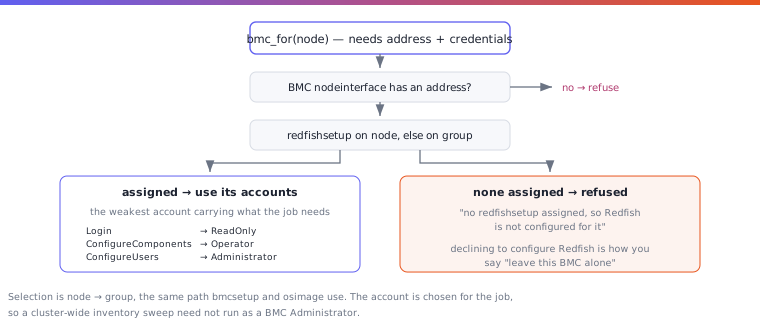
No redfishsetup means no Redfish. A node without one assigned is refused, not reached with
the IPMI credentials. Not configuring Redfish is how an administrator says leave this BMC
alone, and it has to mean something.
The installer's default
A new TrinityX installation creates one redfishsetup, default-redfishsetup, with a single
account, default-redfishaccount, and assigns it to the default group, compute-group, with --setupredfish set: every node in that group
gets the account on its BMC when it installs. The account comes from group_vars/all.yml:
| Variable | Default | Meaning |
|---|---|---|
luna_redfish_user |
rfadmin |
the account Luna creates on each BMC and logs in with; deliberately not the bmcsetup user |
luna_redfish_password |
empty | its password; generated when left empty |
luna_redfish_role |
Administrator |
its Redfish role |
The profile uses https and does not verify the BMC's certificate. It is created once, when
Luna's database is first set up: changing the variables afterwards does not change an existing
cluster. Change the profile with luna redfishsetup instead, and add accounts with weaker roles
there:
# luna redfishsetup changeaccount default-redfishsetup default-redfishaccount --password ...
# luna redfishsetup addaccount default-redfishsetup monitor --username monitor --password ... --role ReadOnly
Creating the accounts on the BMC
The accounts in a redfishsetup are what Luna logs in with; they also have to exist on the
BMC. With --setupredfish set on the group or node, Luna creates or updates them on the BMC
when the node installs, right after the IPMI setup, using the bmcsetup credentials as the
one-time way in. The same can be done on demand:
# luna group change compute --setupredfish y
# luna node setupredfish node001
# luna node setupredfish -g compute
A password that differs on the BMC is brought back to what Luna holds, and the log says so.