Workload management
Slurm is sourced from the OpenHPC stack. This document may also apply for custom slurm installations and through Epel.
SLURM
TrinityX is configured to use the default paths for SLURM. The configuration directory /etc/slurm is shared on all the nodes but links to /trinity/shared/etc/slurm where all the files reside.
For better readability, the files have been split up and included from the main slurm.conf file.
| File | Description |
|---|---|
| slurm.conf | Main configuration file |
| slurm-nodes.conf | Slurm node configuration file - generated and managed through automation |
| slurm-partitions.conf | Partition configuration - generated and managed through automation, like slurm-nodes.conf |
| gres.conf | Slurm generic resource (GRES) configuration file, e.g. GPUs - generated and managed through automation, like slurm-nodes.conf |
| slurmdbd.conf | Slurm Database Daemon (SlurmDBD) configuration file ([see slurmdbd.conf(https://slurm.schedmd.com/slurmdbd.conf.html)]) |
| cgroup.conf | Slurm configuration file for the cgroup support (see cgroup.conf) |
| acct_gather.conf | Slurm configuration file for the acct_gather plugins (see acct_gather.conf) |
| slurm-health.conf | Health check configuration (where applicable) |
| topology.conf | Slurm configuration file for defining the network topology (see topology.conf) |
| slurm-user.conf | Slurm user configuration file (e.g. QoS, priorities) - deprecated, merged into slurm.conf |
By default Luna generates the configuration for nodes and partitions, where the partition is based on the group name. This method is useful for homogeneous node-type cluster where a default node contains the detailed configuration for CPU-s, cores and RAM. When more complexity is desired, e.g. having different node-types, the automation can be overridden by manually configuration in these files, or the graphical slurm configurator can be used.
Graphical slurm configuration application
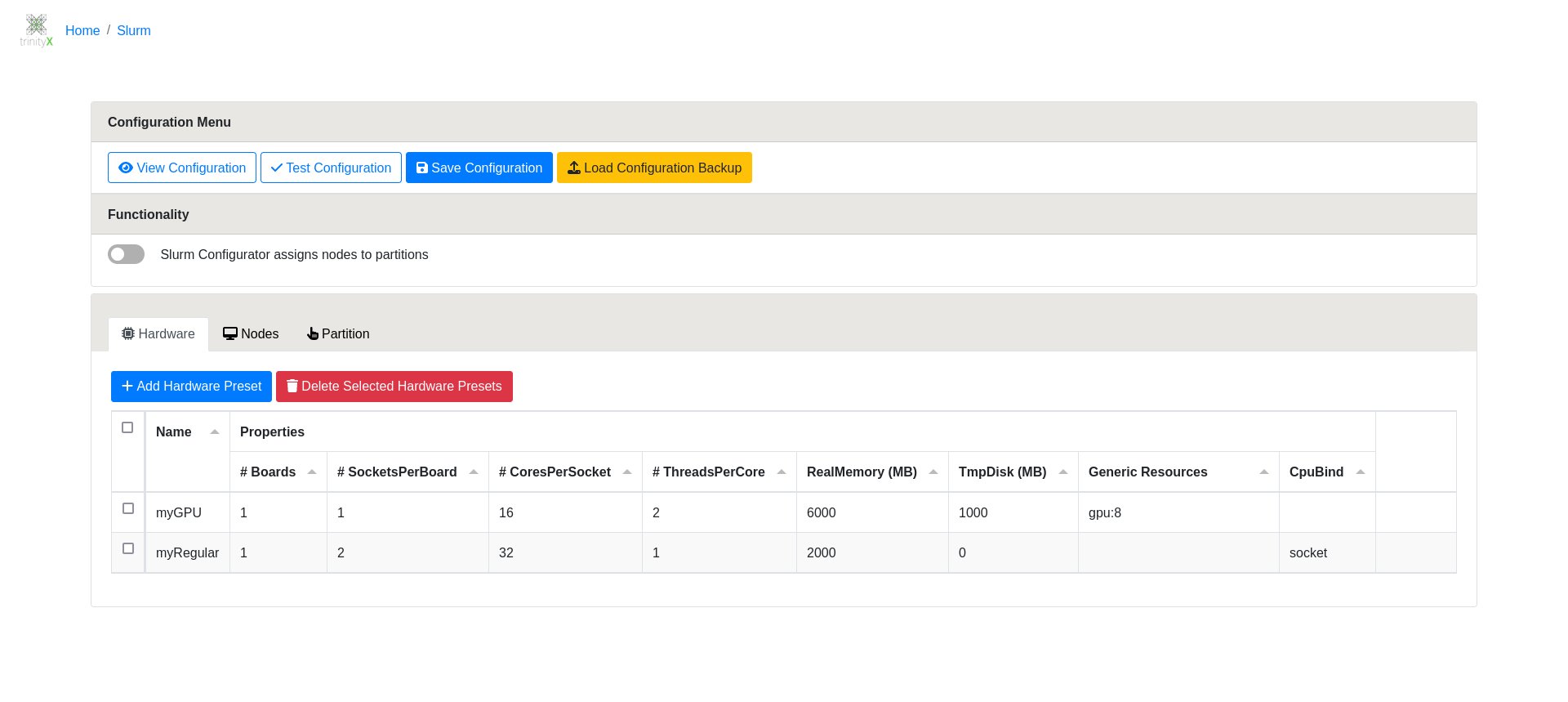
The graphical slurm configurator in action:
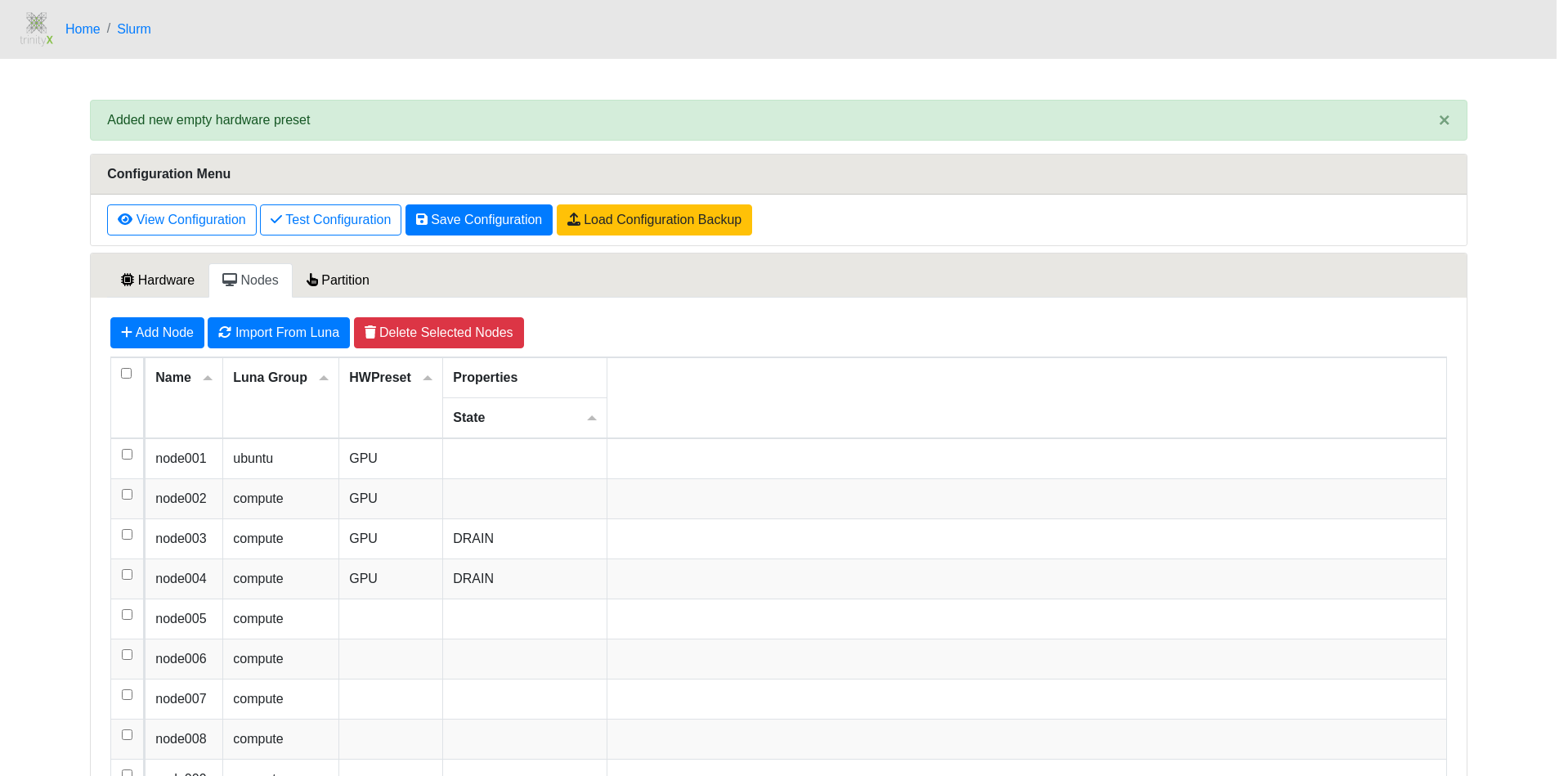
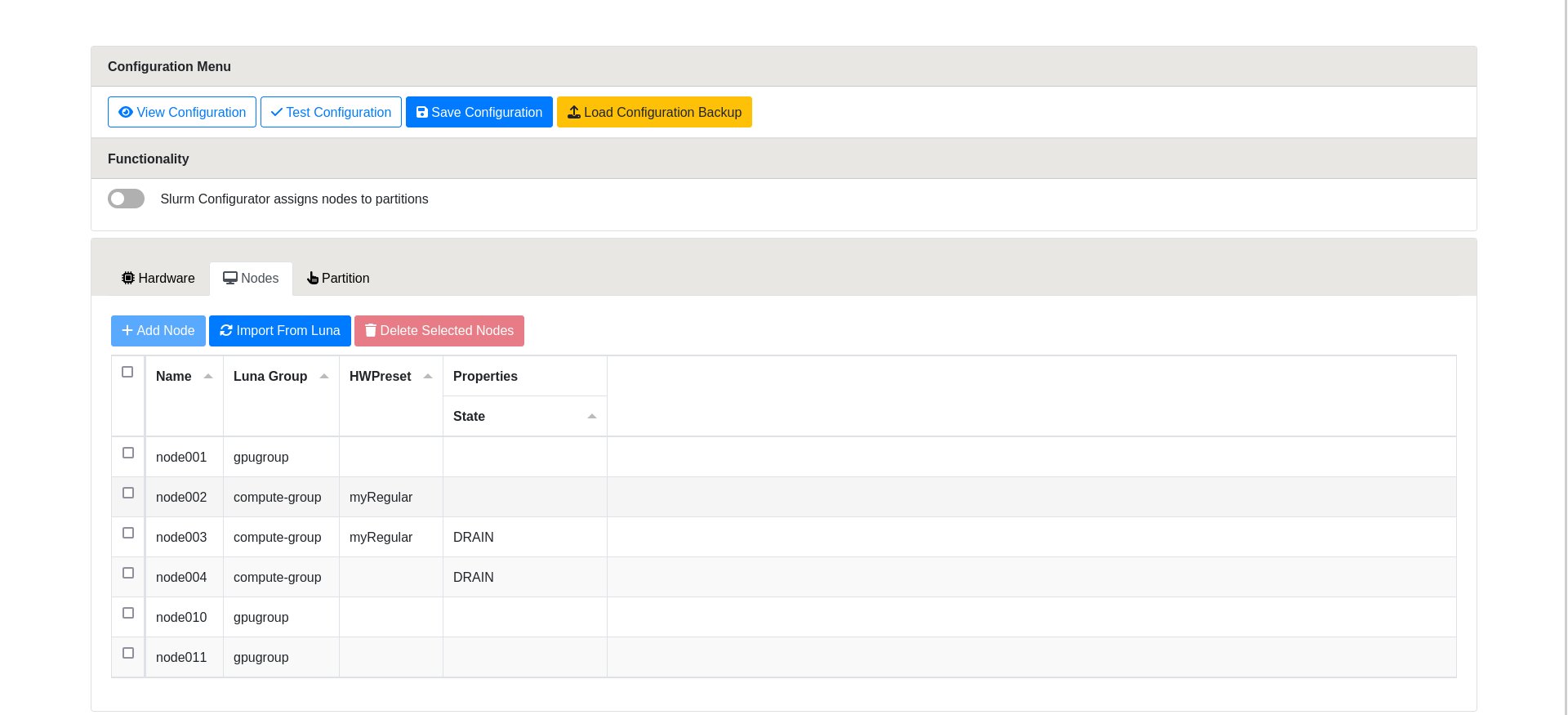
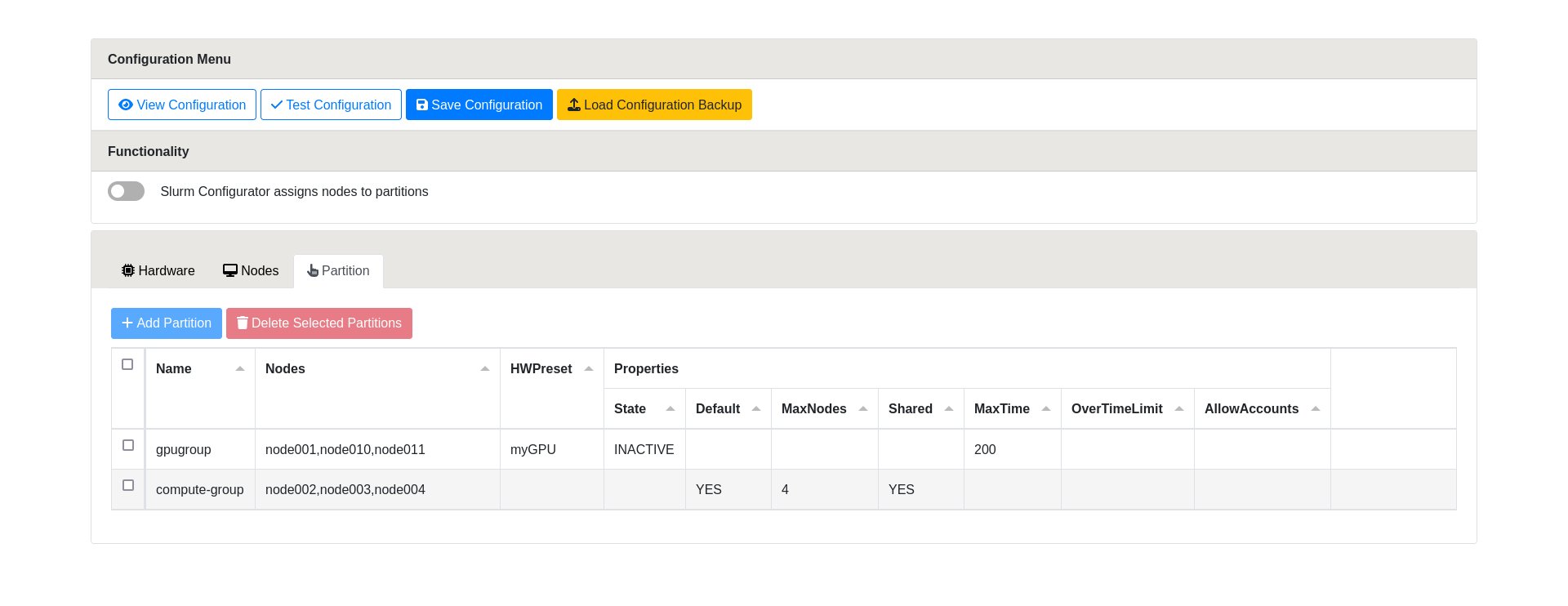
Short guidance: There are three main sections: 'Hardware', 'Nodes' and 'Partitions'. 'Hardware' allows for configuring presets or properties that can be selected for nodes in 'Nodes' and 'Partitions'. Both 'Nodes' and 'Partitions' sections allow for further tailoring of properties. After configuring what's preferred, a configuration can be tested for syntax validity and previewed before saving. For each save a backup is created and can be loaded to revert changes.
Advanced Slurm configuration automation
Philosophy
The files /etc/slurm/slurm-nodes.conf and /etc/slurm/slurm-partitions.conf contain parts that are by default automatically generated. These config files are typically prepared to allow for that automation through two separate blocks "Defaults" and "TrinityX". Outside these blocks, no changes are made through automation whatsoever. Removing the blocks mentioned will permanently stop any automation. Manual changes will then be required to achieve the desired configuration.
The automation entails meta (Defaults) and running configuration (TrinityX) which allows for automatic node and partition generation/configuration as well utilizing the Slurm Graphical Configurator as a utility that manages detailed properties through direct settings or hardware presets. This approach allows luna by default, but also other future utilities to generate and/or automate the actual running configuration. In short: You can have e.g. luna generate the node and partition configuration based on meta information set through the Slurm Graphical Configurator. The best of both worlds.
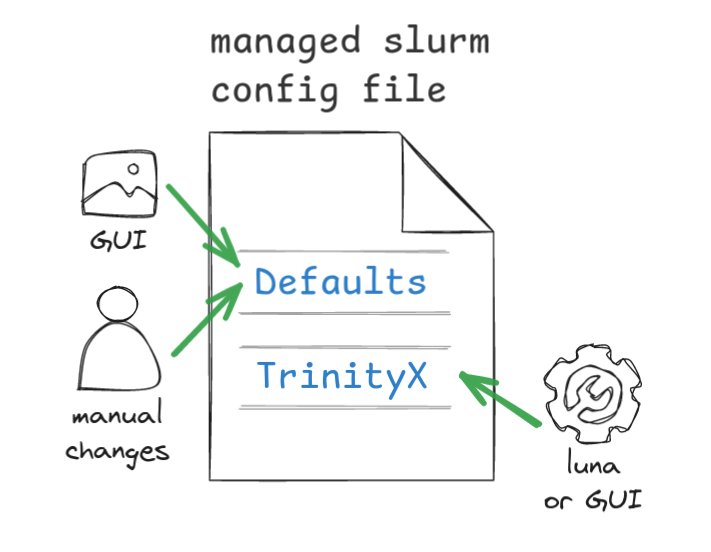
Defaults block
The defaults block contains meta or templating information to assist in generating purposeful/running configuration inside the TrinityX block. The Slurm Graphical Configurator works only with the defaults block, building the meta information.

The meta configuration contains HWPresetName lines as well as PartitionName and NodeName lines. Generated lines may be be altered manually to comply to the needs. Properties that are not supported by the configurator will be kept as is but honored for the automation. It is possible to extend the meta configuration lines to each's liking. The meta configuration lines typically starts with a # as these lines are not the real configuration, though the syntax is compliant to Slurm's way of configuring resources.
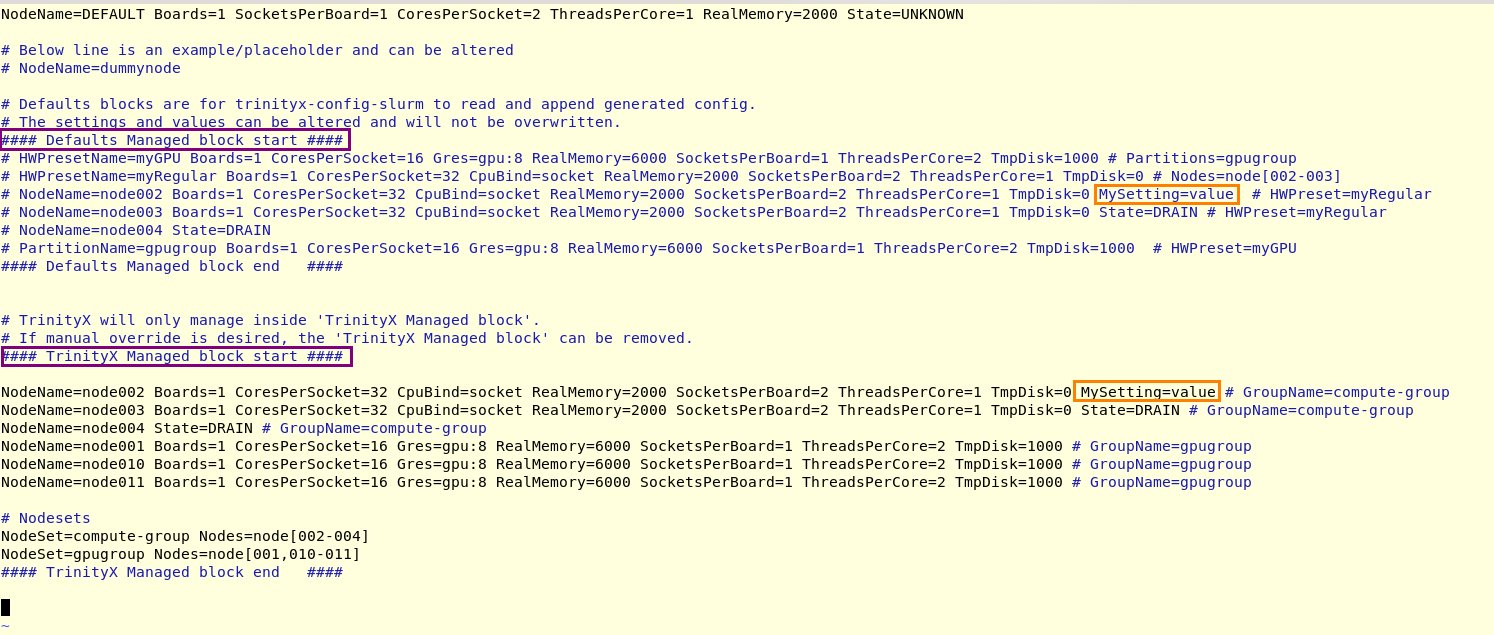
TrinityX block
By default the TrinityX block contains the automation. This means that luna will generate hosts and partitions (based on groups) inside this block, taking the meta configuration in account (Default block). Manual changes inside this block will be overwritten during regeneration, triggered by adding, removing or changing nodes in luna. No changes will be made in the Defaults block.

TrinityX-OOD block
When selecting 'OOD Slurm Configurator manages Nodes and Partitions', as in enabled, the TrinityX block will be changed to TrinityX-OOD. This stops luna automation and nodes and partitions will from here on be managed through the Slurm Graphical Configurator.
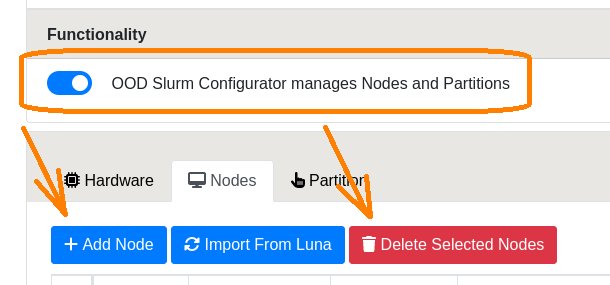
This feature can be stopped or disabled which after that point, other, luna by default, will then generate the nodes and partitions when needed.
Examples
The below examples show how a configuration set in the Slurm Graphical Configurator translates to a running, generated configuration, though luna will render the nodes and partitions.
Hardware Presets
Nodes
Partitions
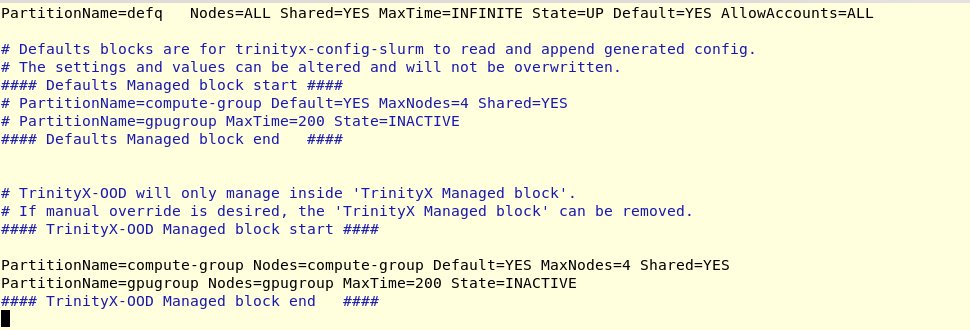
Utility
trix-config-slurm is a utility that can be used to trigger regeneration of the TrinityX block.