BIOS configuration
A BIOS configuration is taken off a machine that has been tuned, stored under a name, and applied to other machines of the same type — the same shape as grabbing and pushing an image. Nothing applies a BIOS configuration unless you ask; it is never automatic.
It works over Redfish and needs BMC access on the nodes involved, with
an account of at least ReadOnly for a grab and Operator for a push. The board's BMC must
expose the BIOS resource and its attribute registry; boards that do not are reported as such.
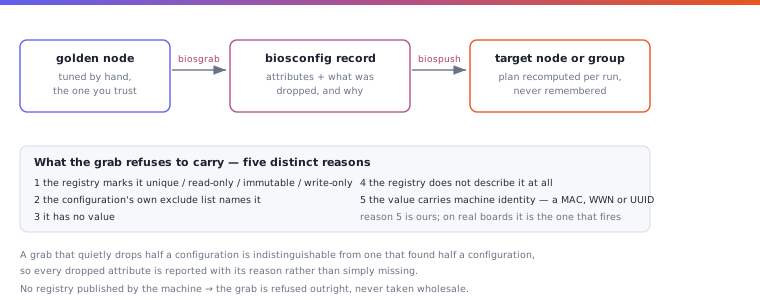
Grabbing
# luna node biosgrab node001 -b hpc-tuned
# luna biosconfig show hpc-tuned
# luna biosconfig show hpc-tuned --settings     # every stored attribute
--settings lists each attribute with the name the board gives the setting, where it gives
one, and its value. The attribute is what a push and -R use; the name is for reading.
The grab creates the configuration. What is stored is decided by the machine's own attribute registry, not by a list Luna keeps per vendor: anything the registry marks unique, read-only, immutable or write-only stays behind, as does anything without a value, anything the registry does not describe, anything whose value carries the machine's identity, and anything the configuration's exclude list names. The exclude list is editable, so a site can leave out what Luna would otherwise carry:
# luna biosconfig change hpc-tuned --grab_exclude "*AssetTag*, *SerialNumber*, *Boot Option*"
Patterns match the attribute's name and the registry's display name, which is what makes them
usable on a board that calls its settings SETUP042.
Changing an entry
A stored configuration can be edited one entry at a time: by a concept that Luna translates
for the board type, by the attribute name the board publishes, or by the setting name that
--settings lists:
# luna biosconfig change hpc-tuned --set hyperthreading=off
# luna biosconfig change hpc-tuned --set sriov=on --set boot_mode=uefi
# luna biosconfig change hpc-tuned --set ProcessorHyperThreading=Disabled
# luna biosconfig change hpc-tuned --set "Ac Loss Control=Last State"
A concept the board type cannot express is refused by name, so a typo does not silently land as
a new attribute. A setting name the board uses for more than one attribute is refused with the
candidates; use the attribute name instead. clone copies a configuration to start a variant from.
Assigning and pushing
A configuration can be assigned to a group or a node; the node's assignment wins. A push without a name pushes what is assigned.
# luna group change gpu -bc hpc-tuned
# luna node biospush node002                   # what node002 is assigned
# luna node biospush node002 -b hpc-tuned      # a named configuration
# luna group biospush gpu
A push is queued and reported as it goes: one stage is a write, a reset and a wait for the machine to finish POST, and a configuration whose attributes depend on one another needs more than one stage. Running a push twice is safe — the plan is recomputed against the machine, and a node that already matches is left alone.
-m decides what happens when the configuration was grabbed at a different BIOS version than
the target runs: strict refuses, warn proceeds and says so, ignore does not look. The
default is the cluster setting. A different manufacturer or model is refused whatever is passed.
Status
# luna biosconfig status
# luna biosconfig status --all            # every node, matched ones included
# luna biosconfig status node002
# luna biosconfig status -g gpu
Status reads the stored inventory and contacts nothing, so it answers for a cluster that is mostly switched off, in one query. It shows counts first and rows only for the nodes that need attention:
| State | Meaning |
|---|---|
matched |
the last read found the node holding its configuration, and it is the configuration assigned to it |
pending |
the node is assigned a configuration it does not hold yet — a different one, or none it was found holding |
stale |
the node holds its configuration, but that configuration has been edited since it was pushed |
drifted |
it matched once and the BIOS has changed since — outside Luna, or a push that half landed |
collected |
the BIOS has been read and matches no stored configuration |
unknown |
no Redfish inventory has been taken yet |
Status will not say how many stages a node still needs; that requires the board's live values.
Ask the machine with biospush, which is a no-op when the configuration has landed.
Booting into the BIOS setup
To get a node into its BIOS setup screen once, without changing anything permanent:
# luna control nextboot bios node001      # one-shot boot to setup, then reset
# luna control nextboot status node001
# luna control nextboot clear node001
The override applies to the next boot only and needs Redfish; the console (lconsole) then
shows the setup screen.